Start here
Where are you in your journey?
Choose the path that fits today. We’ll take you to the most useful discussions.
- GLP-1 medication Zepbound, Wegovy, access, side effects, progress, and support.
- Before surgery Compare procedures, plan ahead, and get honest pre-op answers.
- Post-op Recovery, food stages, symptoms, and support.
- Long-term Regain, labs, habits, and life after the honeymoon.
- Revision Explore revision options, complications, and next steps.


WitchySar
Gastric Sleeve Patients
-
Joined
-
Last visited
-
-
Well drat. I had a question I wanted to ask and I rarely get on here. Kinda sucks to limit access so people can't get the info they are here for. Guess I'll go look elsewhere. Thanks.
-
I had my sleeve almost 2 years ago but I can't post in the Vet forum. I also can't find any info on how to gain access other than where it says you have to be 18+ months out, which I am. How do I get permission to post there?
-
 August 4 2018. A weight loss surgery photo shared by WitchySar in Before and After Gastric Sleeve Photos on BariatricPal.
 -
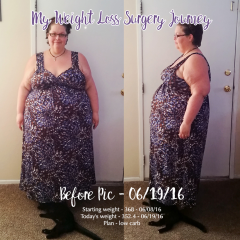 June 19 2016 - Before surgery. A weight loss surgery photo shared by WitchySar in Before and After Gastric Sleeve Photos on BariatricPal.