





Evolving
Gastric Sleeve Patients
-
Joined
-
Last visited
Everything posted by Evolving
-
Wow!!!!!!!! Sent from my iPhone using VST
-
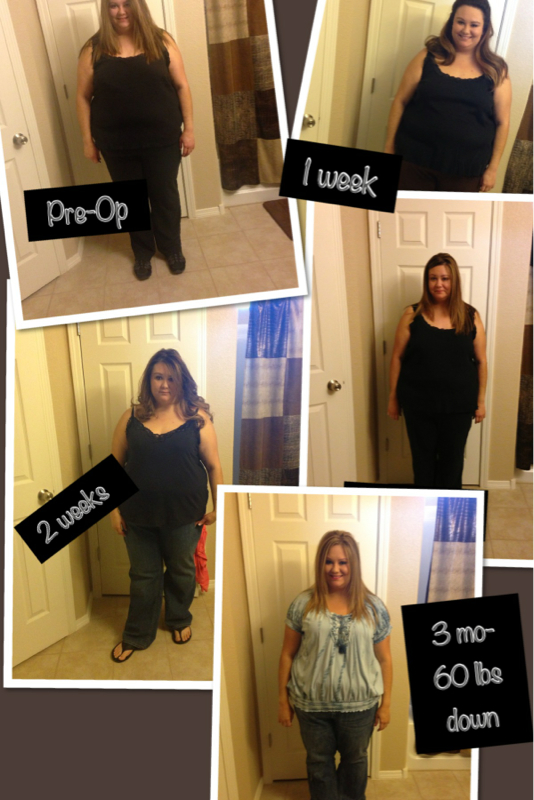
So today is my 3 months! I am down 60- can't really tell yet! But I'm working on it! I graduate in 1 week!!! Sent from my iPhone using VST

 Ylopez You've done great! Sent from my iPhone using VSTWoah! Great!! Sent from my iPhone using VSTAwesome!!! You've done sooooo soooo soooo well!! Sent from my iPhone using VSTWoah!! U are adorable you've done very well ! Any tips?? Sent from my iPhone using VSTAmazing job!! Sent from my iPhone using VSTWow!! Yay! Congrats! U look great!! Any secrets Sent from my iPhone using VSTU look so amazing!! Any secrets? U look great Sent from my iPhone using VSTWish! Great job!!!!!!! How'd u do it Sent from my iPhone using VSTDamn! What's your secret! Wow!! Amazung Sent from my iPhone using VSTU look amazing! So pretty!congrats Sent from my iPhone using VSTyay Sent from my iPhone using VSTYou've done great!! Congrats!!! That's awesome, u look great Sent from my iPhone using VSTCool! You've done a great job! What cals/car s etc do u stay under I was sleeved on feb 25th-- I'm almost 3 mo out Sent from my iPhone using VSTWow that's awesome!! 70 in 3 mo wow!!! What did u do? Sent from my iPhone using VSTThey have lil cans too-- 5.3 oz I think! Drink slow!! Do not gulp Sent from my iPhone using VST

Account
Navigation
Search
Configure browser push notifications
Chrome (Android)
- Tap the lock icon next to the address bar.
- Tap Permissions → Notifications.
- Adjust your preference.
Chrome (Desktop)
- Click the padlock icon in the address bar.
- Select Site settings.
- Find Notifications and adjust your preference.
Safari (iOS 16.4+)
- Ensure the site is installed via Add to Home Screen.
- Open Settings App → Notifications.
- Find your app name and adjust your preference.
Safari (macOS)
- Go to Safari → Preferences.
- Click the Websites tab.
- Select Notifications in the sidebar.
- Find this website and adjust your preference.
Edge (Android)
- Tap the lock icon next to the address bar.
- Tap Permissions.
- Find Notifications and adjust your preference.
Edge (Desktop)
- Click the padlock icon in the address bar.
- Click Permissions for this site.
- Find Notifications and adjust your preference.
Firefox (Android)
- Go to Settings → Site permissions.
- Tap Notifications.
- Find this site in the list and adjust your preference.
Firefox (Desktop)
- Open Firefox Settings.
- Search for Notifications.
- Find this site in the list and adjust your preference.