ASKSARAH - Sleeve
Gastric Sleeve Patients
-
Joined
-
Last visited
-
-
-
-
-
-
 Aliyah14 reacted to a post in a topic:
Anyone use the surgeons on this site ? Ponce DE Leon or others ? Please help need info
Aliyah14 reacted to a post in a topic:
Anyone use the surgeons on this site ? Ponce DE Leon or others ? Please help need info
-
While I was in Mexico from Friday till Monday morning I used Google talk to video chat and text with my husband. MY daughter had a basketball game that saturday and I was able to watch some of it. We also used meebo. I left my phone in airplane mode the whole time I was there.
-
I won't be there, but I wanted to assure you that you are in the best of hands! I am 2 years out and doing amazing. This is easy and you got it!
-
I used dr. Ponce de leon on Feb 1 2013. I cannot say enough nice and effective things about him! The hospital they used and his coordinator. Not only did I go and have amazing results still 2 years out but I have personally sent 3 friends to him and I went with one personally to be her support person. You will not be disappointed. You get to stay in a super clean highly effective 20 bed hospital, then you get to go shopping and stay at a luxury hotel. They take care of EVERYTHING for you. You just show up ready for a change and go home 3 days later. Its really easy and he is so great.
-
gottagonow reacted to a post in a topic:
Men, does a woman's loose skin affect you at intimate times?
-
You are going to do great. Just trust the numbers and the history. Keep walking and if you think you are walking enough walk some more!!
-
-
Check out Mexico. That's where I am headed!!!
-
I would like to know what happened!!!!! I have a friend down there now and doing well and I would like to know some details. Like did he provide you with pain meds? What did you have done? How long were you down there. Dome general idea of what the prices look like. Etc...
-
Whats the sodium count? Usually those things are really high. I try to keep my ingredients to 5 or less. Glad you found something you like!
-
Just do it!? Think as you eat, put that utensil down, measure your food out, breathe!!
-
ABSOLUTELY!! This was one of my favorite meals during my soft food stage. I went ot Trader Joes and got lump crab meat not the imitation since it has sugar in it. I mixed it up with some mayo, some seasoning, salt pepper and a little spicy mustard, to the consistency of mixed tuna, make little patties in the palm of your hand, measure out if you really want to. I heated up some olive oil in a small pan and seared it till it was heated through and flipped and browned. Ate it super slow and it was SOOOO good. Eat and enjoy it!
-
-
-
This is the place to do it.
-
-
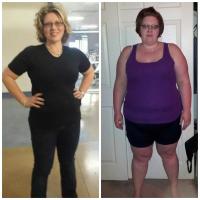
I am like you now! I was 5'5" 264 lbs and I am 34 I was a size 24, 3x tops then I lost a bunch of weight and now I am about 175-180 and a size 6 and a small top.
-
So don't drink them, How far out are you? I gave them up at about 5 weeks post op. No need to drink them if you are getting plenty of Protein organically. I would rather eat than be dependent on powder and chemicals.
-
Umm you need to be drinking and eating soft foods and liquids, Don't get dehydrated thats the worst thing you can do to yourself. You probably feel bad because your not getting enough Fluid in you, go drink gatorade 2 or Powerade 0 or something like that. Get some broth into you as well, If your having the slimies you are probably producing too much acid and or eating too much or too fast. You need to be careful and follow your doctors orders. Go get a PPI, drink drink drink and go eat
-
I had an amazing experience in TJ MX. I had dr. Ponce de leon, $5500 out the door. It was fantastic. I have had the best results. ITs not scary or a weird thing to do, A Lot of people do it and I went alone.
-
Killing yourself would have been easier.... WOW you might want to get some help.