Start here
Where are you in your journey?
Choose the path that fits today. We’ll take you to the most useful discussions.
- GLP-1 medication Zepbound, Wegovy, access, side effects, progress, and support.
- Before surgery Compare procedures, plan ahead, and get honest pre-op answers.
- Post-op Recovery, food stages, symptoms, and support.
- Long-term Regain, labs, habits, and life after the honeymoon.
- Revision Explore revision options, complications, and next steps.

LapBandErin1026
LAP-BAND Patients
-
Joined
-
Last visited
-
-
That's great! I'm scheduled for tomorrow Oct. 26th.
-
Thanks. I'm glad to hear that your band help with the binge eating. I'll let you know how the surgery goes.
-
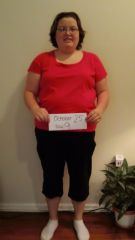
Hi Everyone! I'm new to this forum and just wanted to introduce myself. I'm 29 years old, single, and having Lap-Band surgery Wednesday October 26th. I'm very excited about the surgery but also a little nervous at the same time. I've struggled with my weight for the majority of my life and have also had a Binge Eating Disorder. I hoping the LapBand is the tool that will help me get down to a healthy weight. My highest weight ever was 294 lbs. I started my liquid diet at 241 and I'm now down to 231. I hoping to lose a couple more pounds before Wednesday.