





Skip to content
View in the app

A better way to browse. Learn more.

BariatricPal

A full-screen app on your home screen with push notifications, badges and more.

To install this app on iOS and iPadOS
  1. Tap the Share icon in Safari
  2. Scroll the menu and tap Add to Home Screen.
  3. Tap Add in the top-right corner.
To install this app on Android
  1. Tap the 3-dot menu (⋮) in the top-right corner of the browser.
  2. Tap Add to Home screen or Install app.
  3. Confirm by tapping Install.

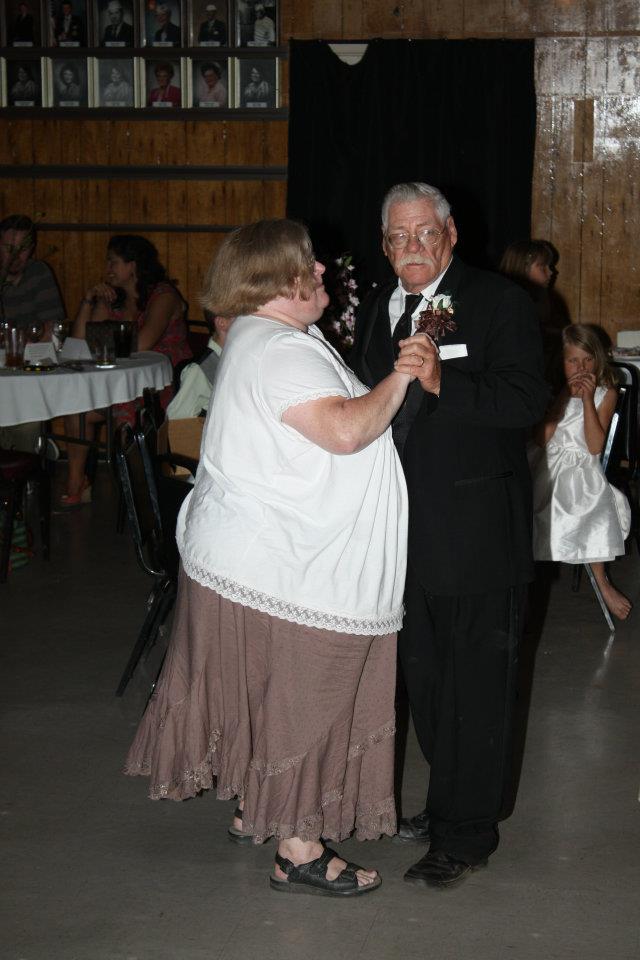
Kris And Ken at our daughter's wedding.

It is tough finding something to wear, especially something cotton. We live in AZ and the wedding was outdoors. Besides, being hot, polyester makes me smell terrible! Like I never bathed or put on deodorant. I didn't think what I wore was that bad, but I had no idea that I stick out so much in the front! I still want pictures of myself, because that is how I am at that point in time.

  • From the album:

    Kristy before

    · 2 images

    Account

    Navigation

    Search

    Search

    Configure browser push notifications

    Chrome (Android)
    1. Tap the lock icon next to the address bar.
    2. Tap Permissions → Notifications.
    3. Adjust your preference.
    Chrome (Desktop)
    1. Click the padlock icon in the address bar.
    2. Select Site settings.
    3. Find Notifications and adjust your preference.