




Konvesayshun Wif Da Buhnnies

By Pookeyism
· 572 views
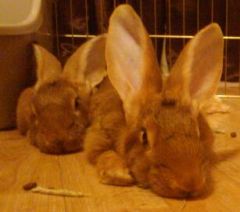
"Wee Ahnn, ah haf bin tinking - eew shood nawt haf da zurgerhy", my flemmish giant rabbit Cadmiun says to me, as I lay in the floor and pet her and her brother, Antimony.
"ah haf to ehgree", says Antimony "whaaf sumzing haffins doe eew?"
I pat Cadmium on the head, and touch noses with Antimony "I think I will be okay. I have done alot of studying and I have picked a very good doctor"
"i herdz eew whill beh all hurty fer daz" says Cadmium.
"eew whill notz beh aybelz tew pay wif uz!" says Antimony, as he jumps on my back.
"I will be very sore, and it will be awhile before I can crawl around and stuff, but I will be home and I am gong to have Jonathan make me a really comfortable bed on the floor with the air mattress when it is playtime, so I can still pet you." I reassure Cadmium with a good head scratch.
"okays" says Cadmium "gotz strahberrez?"
"yes little one, I have some strawberries".
Our fleeting conversation is done, and we continue to play. I need to remember to be in the moment through all of this. Thank you friends for reminding me to not lose sight of the little things as I take such a big step. I do not want to miss the wonderful things I have now while waiting for surgery, and then waiting ot lose weight.
Recommended Comments