Skip to content
View in the app

A better way to browse. Learn more.

BariatricPal

A full-screen app on your home screen with push notifications, badges and more.

To install this app on iOS and iPadOS
  1. Tap the Share icon in Safari
  2. Scroll the menu and tap Add to Home Screen.
  3. Tap Add in the top-right corner.
To install this app on Android
  1. Tap the 3-dot menu (⋮) in the top-right corner of the browser.
  2. Tap Add to Home screen or Install app.
  3. Confirm by tapping Install.

Weight

I haven't been on here for a few years. Where do

I post my weight for today? Plus will it be added to my ticker. ThanksFB_IMG_1630876222553.jpg

Sent from my SM-A515U1 using BariatricPal mobile app

  • Replies 7
  • Views 1k
  • Created
  • Last Reply

Top Posters In This Topic

Most Popular Posts

  • vikingbeast
    vikingbeast

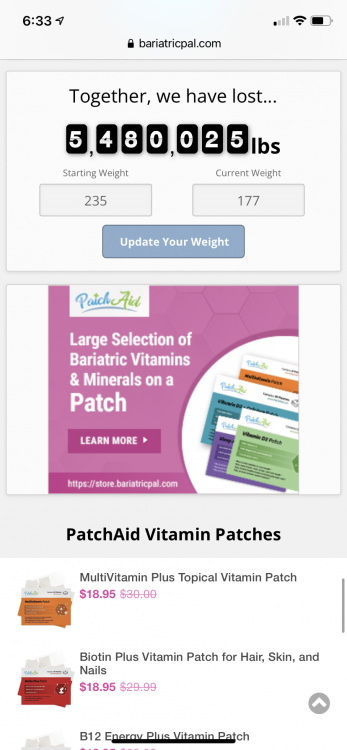
    If you scroll down the right side, under the ads for "Hot Products", there's a little doohickey that says "Together, we have lost..." (it's currently at nearly 5.5 million pounds). Under that is a pla

  • Just scroll down on the screen you are reading right now as you read this. WAY down, past where it says trending products, recent products, hot topics, etc and keep scrolling to where it says together

  • vikingbeast
    vikingbeast

    Oh, you’re on the mobile app. I don’t have that. My recommendation assumed you were using the website. Perhaps someone else can chime in if they know the app.

Posted Images
Featured Replies

If you scroll down the right side, under the ads for "Hot Products", there's a little doohickey that says "Together, we have lost..." (it's currently at nearly 5.5 million pounds). Under that is a place for your starting weight and your current weight. It'll update your ticker automagically.

You can also do it from your profile, but this is way easier since most people don't need to update anything besides their CW.

  • Author

Where does it say hot topics? I am really not stupid. [emoji1787]

Sent from my SM-A515U1 using BariatricPal mobile app

  • Author
If you scroll down the right side, under the ads for "Hot Products", there's a little doohickey that says "Together, we have lost..." (it's currently at nearly 5.5 million pounds). Under that is a place for your starting weight and your current weight. It'll update your ticker automagically.
You can also do it from your profile, but this is way easier since most people don't need to update anything besides their CW.
Hi where do i find adds? where do I find hot projects? I am very confused.

Thanks

Sent from my SM-A515U1 using BariatricPal mobile app

1FA3CDE6-AFC7-4933-9F3A-054E94F66B15.thumb.png.0d14e6c639b5169cdea3608fd1ed4ba7.pngJust scroll down on the screen you are reading right now as you read this. WAY down, past where it says trending products, recent products, hot topics, etc and keep scrolling to where it says together we have lost…

Edited by ShoppGirl

Oh, you’re on the mobile app. I don’t have that. My recommendation assumed you were using the website. Perhaps someone else can chime in if they know the app.

I find this site vert un-user friendly. it is confusing, and hard to figure out.

  • Author

Thanks I figured it out. Easier on the website.

Sent from my SM-A515U1 using BariatricPal mobile app

Join the conversation

You can post now and register later. If you have an account, sign in now to post with your account.

Guest
Reply to this topic...

Trending Products

PatchAid Vitamin Patches

Account

Navigation

Search

Search

Configure browser push notifications

Chrome (Android)
  1. Tap the lock icon next to the address bar.
  2. Tap Permissions → Notifications.
  3. Adjust your preference.
Chrome (Desktop)
  1. Click the padlock icon in the address bar.
  2. Select Site settings.
  3. Find Notifications and adjust your preference.