Skip to content
View in the app

A better way to browse. Learn more.

BariatricPal

A full-screen app on your home screen with push notifications, badges and more.

To install this app on iOS and iPadOS
  1. Tap the Share icon in Safari
  2. Scroll the menu and tap Add to Home Screen.
  3. Tap Add in the top-right corner.
To install this app on Android
  1. Tap the 3-dot menu (⋮) in the top-right corner of the browser.
  2. Tap Add to Home screen or Install app.
  3. Confirm by tapping Install.

How do you post a "status update"

Hi All,

I'm new so I'm not as familiar with this website. But I would like to post a "status update" but I can't figure out how to do that. Obviously, I can post on topic threads but that isn't what I'm interested in doing.

Any instructions would be appreciated!

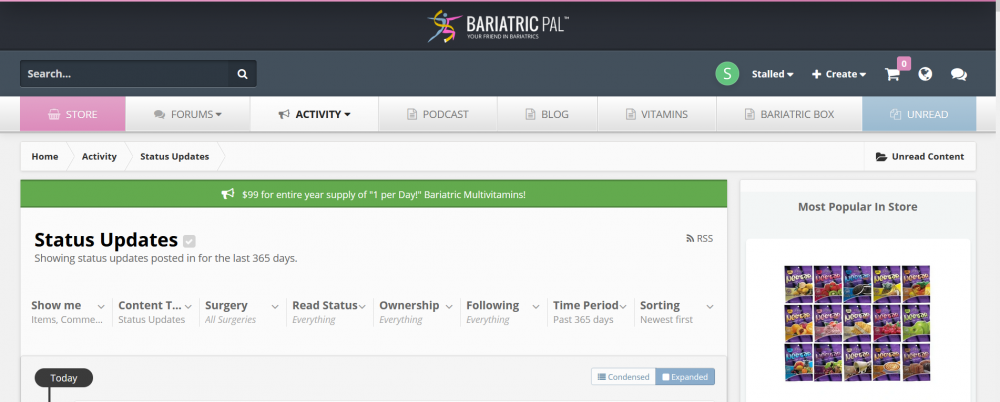
Below is what I am seeing when I go to the status updates page. As far as I can tell, there isn't anywhere for me to create new content.

image.thumb.png.e2fae93447970b87cafa683e14299480.png

  • Replies 7
  • Views 1.9k
  • Created
  • Last Reply

Top Posters In This Topic

Posted Images

Featured Replies

Click on "create" at the top of your screen and select "status." You can do an update there. It doesn't look like many people respond to those though.

  • Author
4 hours ago, Lynnlovesthebeach said:

Click on "create" at the top of your screen and select "status." You can do an update there. It doesn't look like many people respond to those though.

Hi Lynn,

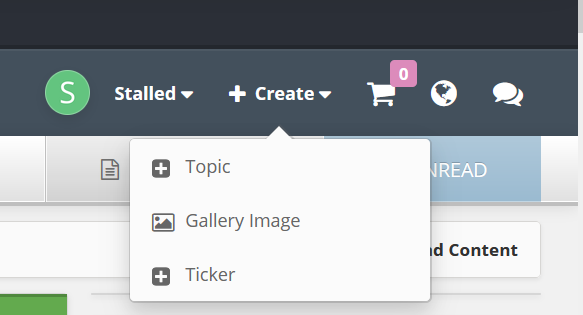
My "create" tab doesn't have a "status" option. image.png.a2ac12a05df98913787d268660404e74.png

Are you trying to update your "progress" i.e. your weight and stuff? That would be to go to the top of the screen where your user name is, then the arrow next to it, then click on "my surgery" then "progress". (progress is to the left on the "my surgery" screen)/

  • Author
Just now, lizonaplane said:

Are you trying to update your "progress" i.e. your weight and stuff? That would be to go to the top of the screen where your user name is, then the arrow next to it, then click on "my surgery" then "progress". (progress is to the left on the "my surgery" screen)/

No, I just notice that there is a "status updates" section that people seem to be able to post to that aren't topic thread-worthy. But I can't find anywhere that lets me post a status update. I emailed bariatricpal using their "contact us" link but no one has gotten back to me and it's been about 5 days now.

I was able to figure out how to update my weight and stuff yesterday! I only weigh on Sunday mornings so seeing that I lost 5 pounds this week made me want to explore the website more and see if I could post on the status updates like I'm seeing others do.

Hrm... I just looked and I do have the status update option. Maybe it has to do with what type of device or browser you are using? I'm using a PC and chrome.

  • Author
6 minutes ago, lizonaplane said:

Hrm... I just looked and I do have the status update option. Maybe it has to do with what type of device or browser you are using? I'm using a PC and chrome.

I just tried going onto chrome and it still doesn't display for me. I am also using my PC and not the phone app. So weird.

19 hours ago, Stalled said:

Hi Lynn,

My "create" tab doesn't have a "status" option. image.png.a2ac12a05df98913787d268660404e74.png

That's odd. Right above "topic" in that screen I have "Update." I'm on my Mac desktop, not my phone. Sorry, I guess I can't help then.

Join the conversation

You can post now and register later. If you have an account, sign in now to post with your account.

Guest
Reply to this topic...

Trending Products

PatchAid Vitamin Patches

Account

Navigation

Search

Search

Configure browser push notifications

Chrome (Android)
  1. Tap the lock icon next to the address bar.
  2. Tap Permissions → Notifications.
  3. Adjust your preference.
Chrome (Desktop)
  1. Click the padlock icon in the address bar.
  2. Select Site settings.
  3. Find Notifications and adjust your preference.