Skip to content
View in the app

A better way to browse. Learn more.

BariatricPal

A full-screen app on your home screen with push notifications, badges and more.

To install this app on iOS and iPadOS
  1. Tap the Share icon in Safari
  2. Scroll the menu and tap Add to Home Screen.
  3. Tap Add in the top-right corner.
To install this app on Android
  1. Tap the 3-dot menu (⋮) in the top-right corner of the browser.
  2. Tap Add to Home screen or Install app.
  3. Confirm by tapping Install.

Baritastic

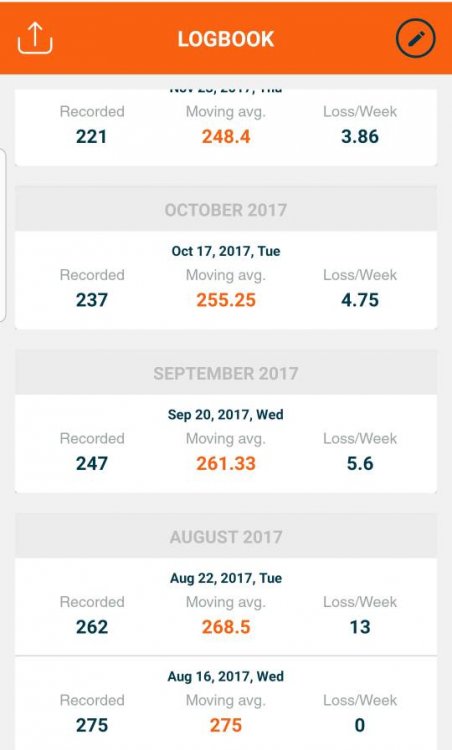
Hi, just started using Baritastic, I'm a little confused. In the weight logbook, what does the "moving average" mean. Is the average that other ppl weigh ? It makes no sense to me.

Sent from my SM-G950U1 using BariatricPal mobile app

  • Replies 6
  • Views 7.2k
  • Created
  • Last Reply

Top Posters In This Topic

Posted Images

Featured Replies

I use that one too and i don't see that. where is it located

  • Author

I use that one too and i don't see that. where is it located

When I look at all the weight I logged under logbook. The orange numbers20191213_125652.jpeg

Sent from my SM-G950U1 using BariatricPal mobile app

  • 1 year later...
I’m glad we are all confused on that because I saw that and my “moving avg” is always higher than my actual weight so what gives?

Overall I really like the app though. I like the milestone goals and the weekly average and all the other stuff.

Summary. The weighted moving average(WMA) is a technical indicator that assigns a greater weighting to the most recent data points, and less weighting to data points in the distant past. The WMA is obtained by multiplying each number in the data set by a predetermined weight and summing up the resulting values.

Moving average weight mode uses a trend predictor to predict what your weight is, and this usually results in a pretty smooth downward line. Instead of plateauing for 6 days and then losing 0.6 all at once, moving average weight mode is more likely to say you're losing 0.1 pounds all 6 of the days.
It is also known as "happy scale".

Join the conversation

You can post now and register later. If you have an account, sign in now to post with your account.

Guest
Reply to this topic...

Trending Products

PatchAid Vitamin Patches

Account

Navigation

Search

Search

Configure browser push notifications

Chrome (Android)
  1. Tap the lock icon next to the address bar.
  2. Tap Permissions → Notifications.
  3. Adjust your preference.
Chrome (Desktop)
  1. Click the padlock icon in the address bar.
  2. Select Site settings.
  3. Find Notifications and adjust your preference.