Skip to content
View in the app

A better way to browse. Learn more.

BariatricPal

A full-screen app on your home screen with push notifications, badges and more.

To install this app on iOS and iPadOS
  1. Tap the Share icon in Safari
  2. Scroll the menu and tap Add to Home Screen.
  3. Tap Add in the top-right corner.
To install this app on Android
  1. Tap the 3-dot menu (⋮) in the top-right corner of the browser.
  2. Tap Add to Home screen or Install app.
  3. Confirm by tapping Install.
  • Appearance

Join BariatricPal free

  • Ask your own questions
  • Reply and follow topics
  • Message other members
  • No cost, no spam

Weird Email Message PW Authentication Message

Hi guys! My email hasn't changed, yet I got this message popping up wanting me to update my email. And when I did it gave me this message wanting me to re-enter my password. I didn't change my email. It's still valid. And still in use, and I'm getting email notifications from BP. So why am I being prompted to enter my password. Am I being hacked by someone using a disguise of BP in order to capture my pw?

Thanks!

Fluffy

image.thumb.png.a87ddbe1950ae6ee23544198ce9b55b2.png

  • Replies 16
  • Views 3.4k
  • Created
  • Last Reply

Top Posters In This Topic

Most Popular Posts

  • Oh @Ken S.! Oh Ken!!! Ken Ken Kenster Kenny-my-mayun, goodbuddy, my pal... Guess what I got in my notifications just now. *sniff* *sob* *ohnoooooooooooosssssssss* (psst It wasn't a letter from S

  • Got another love letter today!

  • Hi @FluffyChix, was the password popup that you saw initially displayed directly on BariatricPal.com? Or was it an email that received or something along those lines?

Posted Images
Featured Replies

5 minutes ago, FluffyChix said:

Hi guys! My email hasn't changed, yet I got this message popping up wanting me to update my email. And when I did it gave me this message wanting me to re-enter my password. I didn't change my email. It's still valid. And still in use, and I'm getting email notifications from BP. So why am I being prompted to enter my password. Am I being hacked by someone using a disguise of BP in order to capture my pw?

Thanks!

Fluffy

image.thumb.png.a87ddbe1950ae6ee23544198ce9b55b2.png

Hi @FluffyChix, was the password popup that you saw initially displayed directly on BariatricPal.com? Or was it an email that received or something along those lines?

  • Author
1 minute ago, Ken S. said:

Hi @FluffyChix, was the password popup that you saw initially displayed directly on BariatricPal.com? Or was it an email that received or something along those lines?

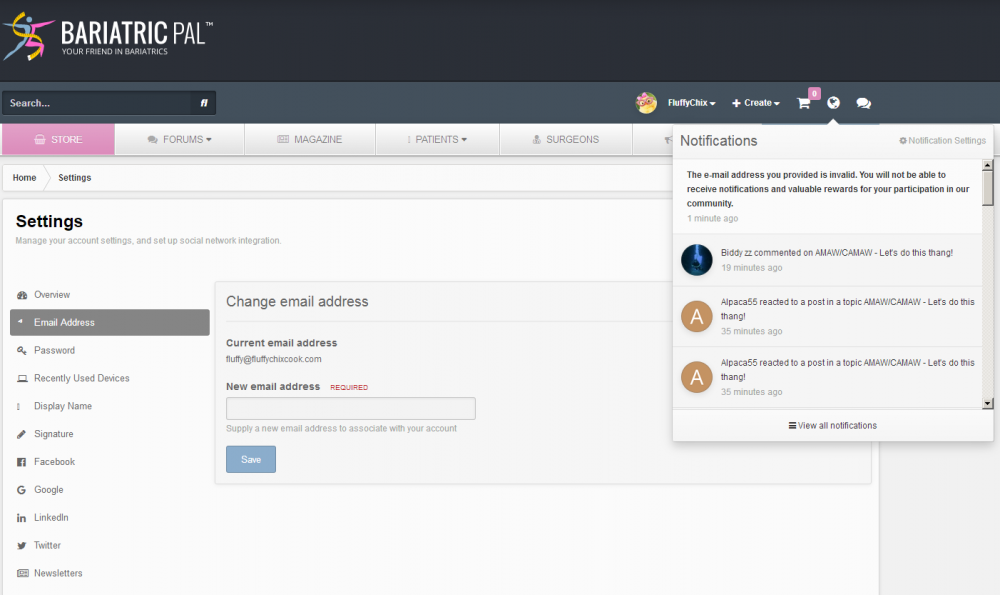
Hi Ken! Thanks for getting back to me so quickly. Here is where I got it:

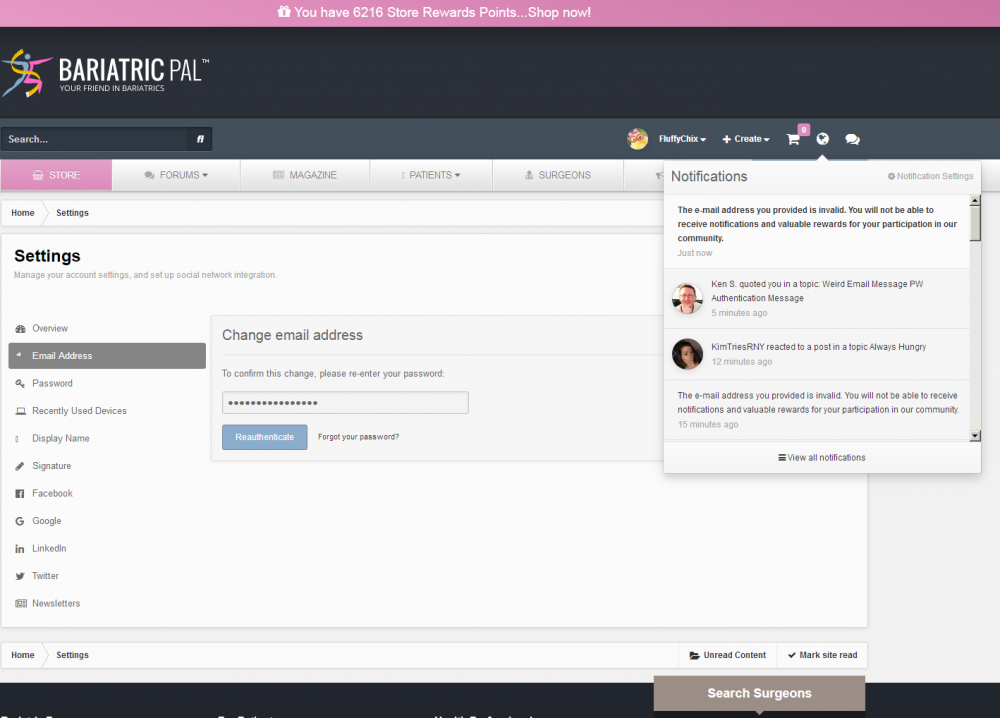
It popped up as a Notification (upper right of screen--third message down) and it keeps popping up. Then when I click on it, it leads me to this screen. But my email is exactly the same. No change. Then it wants me to type in my password. But nothing has changed and it set off alarm bells that maybe some bad guy was trying to capture my password.

image.thumb.png.602daaad5ced50b95ef248003fe9780d.png

  • Author

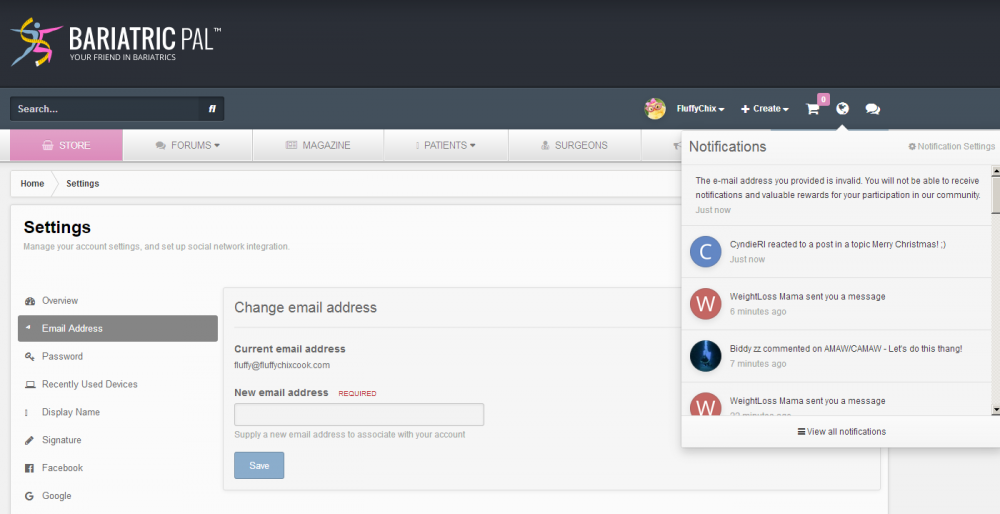
Just popped up again for the third time:

image.thumb.png.d436764ba0a8a92ebfa57c06dd3765ca.png

And while we are on the matter of weird notifications- I occasionally am getting " No Permission", I could understand if I was trying to access The Veterans Forum, because I haven't fulfilled the requirements but this may show up on post-surgery, sleeve or other forums. AM I somehow confusing the internet gurus???

@FluffyChix Aha, that message is indeed generated by our system, and it's nothing to be afraid of ?. The message is being generated in error - we're looking into it as we speak!

I'll update you when we have it all sorted out, thank you for letting us know!

  • Author
1 minute ago, Ken S. said:

@FluffyChix Aha, that message is indeed generated by our system, and it's nothing to be afraid of ?. The message is being generated in error - we're looking into it as we speak!

I'll update you when we have it all sorted out, thank you for letting us know!

Thank you Ken! Appreciate your hard work!

On 11/19/2018 at 9:54 AM, FluffyChix said:

Thank you Ken! Appreciate your hard work!

You got it! We believe we've resolved this issue - can you let me know if it's been OK so far today?

Thanks in advance!

  • Author
3 minutes ago, Ken S. said:

You got it! We believe we've resolved this issue - can you let me know if it's been OK so far today?

Thanks in advance!

So far, no love notes! I did reset my pw though. And it looks like I'm getting my email notifications. :)

TY and have an awesome Thanksgiving!

JazzHands.JPG.812ffef734f36dae6c9a3b23d7527ab9.JPG Jazz Hands!

4 minutes ago, Matt Z said:

Thanks Matt! We're looking into this now.

  • Author

You’re awesome sauce, Ken! TY for all you do!

13 minutes ago, Ken S. said:

Hi @Matt Z - I believe we've got this issue resolved - please let me know if you're still having issues!

I've still got 2 of them in my notifications list, but if it's dealt with on your end, I'm ok with them still being there.


Thanks Ken!

Just now, Matt Z said:

I've still got 2 of them in my notifications list, but if it's dealt with on your end, I'm ok with them still being there.


Thanks Ken!

Hi @Matt Z, they should still appear there, but they shouldn't be from after I responded saying it was fixed - they should be from prior to that.

They should drop out of your notifications altogether over the next few weeks.

  • Author

Oh @Ken S.! Oh Ken!!! Ken Ken Kenster Kenny-my-mayun, goodbuddy, my pal...

Guess what I got in my notifications just now. :( *sniff* *sob* *ohnoooooooooooosssssssss* (psst It wasn't a letter from Santa about how good I've been this year...)

image.thumb.png.463ba1b8350c40bd2d3ac064338f7a5f.png

Join the conversation

You can post as a guest; create a free account to track replies, follow topics, and be part of the largest weight loss surgery community.

Join the conversation

You can post now and register later. If you have an account, sign in now to post with your account.

Guest
Reply to this topic...

Account

Navigation

Search

Search

Configure browser push notifications

Chrome (Android)
  1. Tap the lock icon next to the address bar.
  2. Tap Permissions → Notifications.
  3. Adjust your preference.
Chrome (Desktop)
  1. Click the padlock icon in the address bar.
  2. Select Site settings.
  3. Find Notifications and adjust your preference.