Skip to content
View in the app

A better way to browse. Learn more.

BariatricPal

A full-screen app on your home screen with push notifications, badges and more.

To install this app on iOS and iPadOS
  1. Tap the Share icon in Safari
  2. Scroll the menu and tap Add to Home Screen.
  3. Tap Add in the top-right corner.
To install this app on Android
  1. Tap the 3-dot menu (⋮) in the top-right corner of the browser.
  2. Tap Add to Home screen or Install app.
  3. Confirm by tapping Install.

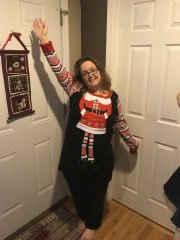
Almost at one year anniversary

  • Replies 15
  • Views 1.8k
  • Created
  • Last Reply

Featured Replies

Great Transformation! Congratulations! You look great!

Wow! What a doll baby and huge transformation!!! Do you feel completely different?

The result of doing the work! Congratulations!

4 hours ago, KaylaWls1216 said:

IMG_20171024_010324.thumb.jpg.a3eb59547e3ce217a8a6bdb132073cec.jpg all I can say is My Spiritual Healer is Great and I'm thankful for my tool .I did the work my tool just helps me and remind me to be f**king great ! Kayla
Sent from my Z981 using BariatricPal mobile app

Beautiful on the inside and out. Celebrate all your hard work! ....you earned this.

I can only imagine that you feel so.damn.great with the extra weight gone. Good job!!!!

I love your bright beautiful smile and congratulations on all that hard work! you should be so proud of your accomplishments!!!!!

Congratulations. You look great..

Sent from my XT1585 using BariatricPal mobile app

Archived

This topic is now archived and is closed to further replies.

Trending Products

PatchAid Vitamin Patches

Account

Navigation

Search

Search

Configure browser push notifications

Chrome (Android)
  1. Tap the lock icon next to the address bar.
  2. Tap Permissions → Notifications.
  3. Adjust your preference.
Chrome (Desktop)
  1. Click the padlock icon in the address bar.
  2. Select Site settings.
  3. Find Notifications and adjust your preference.