Skip to content
View in the app

A better way to browse. Learn more.

BariatricPal

A full-screen app on your home screen with push notifications, badges and more.

To install this app on iOS and iPadOS
  1. Tap the Share icon in Safari
  2. Scroll the menu and tap Add to Home Screen.
  3. Tap Add in the top-right corner.
To install this app on Android
  1. Tap the 3-dot menu (⋮) in the top-right corner of the browser.
  2. Tap Add to Home screen or Install app.
  3. Confirm by tapping Install.
  • Cart

Pictures

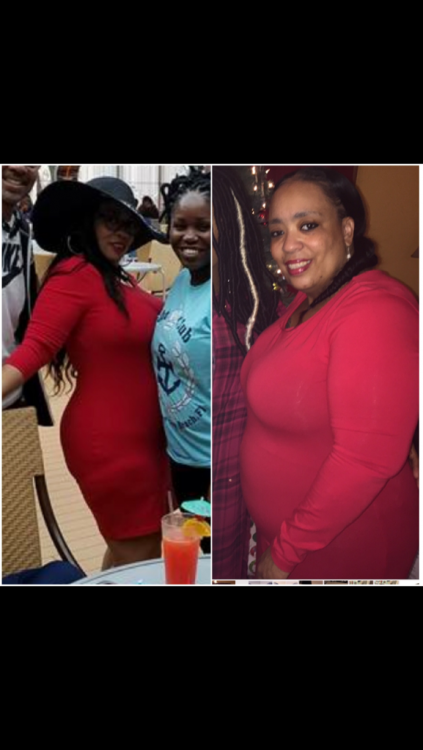
This is a collage my daughter sent me to show me my progress.....it definitely keeps me motivated to continue this journey. The picture of me without the hat was taken Christmas 2015; the picture of me in the black hat was taken April 2017-about 8 weeks post surgery (same dress!).Thank you VSG!!!!IMG_56121.png
Sent from my SM-G935P using BariatricPal mobile app

  • Replies 9
  • Views 1k
  • Created
  • Last Reply

Featured Replies

This is a collage my daughter sent me to show me my progress.....it definitely keeps me motivated to continue this journey. The picture of me without the hat was taken Christmas 2015; the picture of me in the black hat was taken April 2017-about 8 weeks post surgery (same dress!).Thank you VSG!!!!IMG_56121.thumb.png.d0e87927b0ce5cb7c52c9406386068b6.png
Sent from my SM-G935P using BariatricPal mobile app


You look amazing!


  • 3 months later...
  • Author

I must admit.....this has become one of MY FAVORITE PICTURES! I'm loving the weight loss it showed just 7weeks post op. I'm going 2 take another pic in that dress soon, now that I'm 6months post op. I'll post it soon!

Sent from my SM-G935P using BariatricPal mobile app

  • Author

And yes, the dress still fits-albeit looser-it's a "bodycon" dress from Forever21. LOL!

Sent from my SM-G935P using BariatricPal mobile app

Archived

This topic is now archived and is closed to further replies.

Trending Products

PatchAid Vitamin Patches

Account

Navigation

Search

Search

Configure browser push notifications

Chrome (Android)
  1. Tap the lock icon next to the address bar.
  2. Tap Permissions → Notifications.
  3. Adjust your preference.
Chrome (Desktop)
  1. Click the padlock icon in the address bar.
  2. Select Site settings.
  3. Find Notifications and adjust your preference.