Skip to content
View in the app

A better way to browse. Learn more.

BariatricPal

A full-screen app on your home screen with push notifications, badges and more.

To install this app on iOS and iPadOS
  1. Tap the Share icon in Safari
  2. Scroll the menu and tap Add to Home Screen.
  3. Tap Add in the top-right corner.
To install this app on Android
  1. Tap the 3-dot menu (⋮) in the top-right corner of the browser.
  2. Tap Add to Home screen or Install app.
  3. Confirm by tapping Install.

Progress in the works!

  • Replies 16
  • Views 1.7k
  • Created
  • Last Reply

Featured Replies

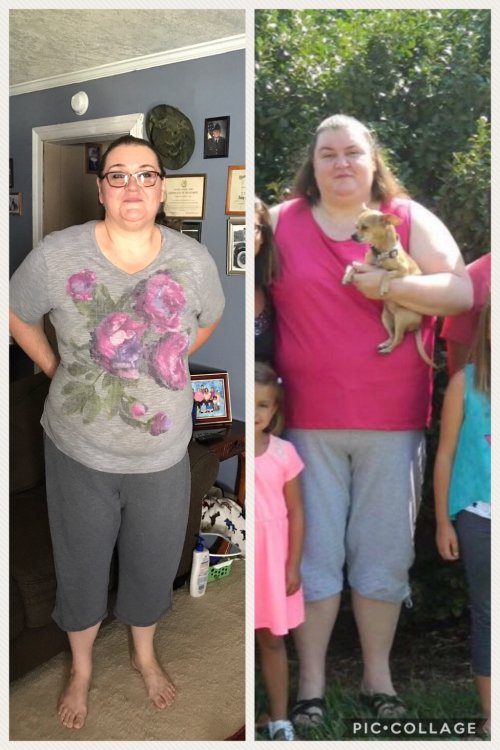
I had RNY on 11/14/16 starting at 341. As of today I am 277. Although I have lost inches as well. I started in a size 4X pants and I'm getting ready to get into a 2X. IMG_0714.thumb.JPG.29d51e8acd6e8ecc68a052705af415e7.JPG

Congratulations looking good. Keep up the good work


  • Author

I fee the same way. Had my RYN 2/13/17.. love watching the changes


I put on a tshirt that six months ago did not fit. It's a 3X, it swallows me. I was telling my daughter n law that it's just so hard to believe at times all the changes happening.


I put on a tshirt that six months ago did not fit. It's a 3X, it swallows me. I was telling my daughter n law that it's just so hard to believe at times all the changes happening.


Hahahaha yes I know what you mean 8E2D5ED3-DF77-4308-B239-09D88C4DDDBF.jpg


That's awesome.


Congrats, you have done great[emoji41]

Sent from my S8+ using BariatricPal mobile app[emoji41]

Archived

This topic is now archived and is closed to further replies.

Account

Navigation

Search

Search

Configure browser push notifications

Chrome (Android)
  1. Tap the lock icon next to the address bar.
  2. Tap Permissions → Notifications.
  3. Adjust your preference.
Chrome (Desktop)
  1. Click the padlock icon in the address bar.
  2. Select Site settings.
  3. Find Notifications and adjust your preference.