Skip to content
View in the app

A better way to browse. Learn more.

BariatricPal

A full-screen app on your home screen with push notifications, badges and more.

To install this app on iOS and iPadOS
  1. Tap the Share icon in Safari
  2. Scroll the menu and tap Add to Home Screen.
  3. Tap Add in the top-right corner.
To install this app on Android
  1. Tap the 3-dot menu (⋮) in the top-right corner of the browser.
  2. Tap Add to Home screen or Install app.
  3. Confirm by tapping Install.

Post-Op liquid Broth

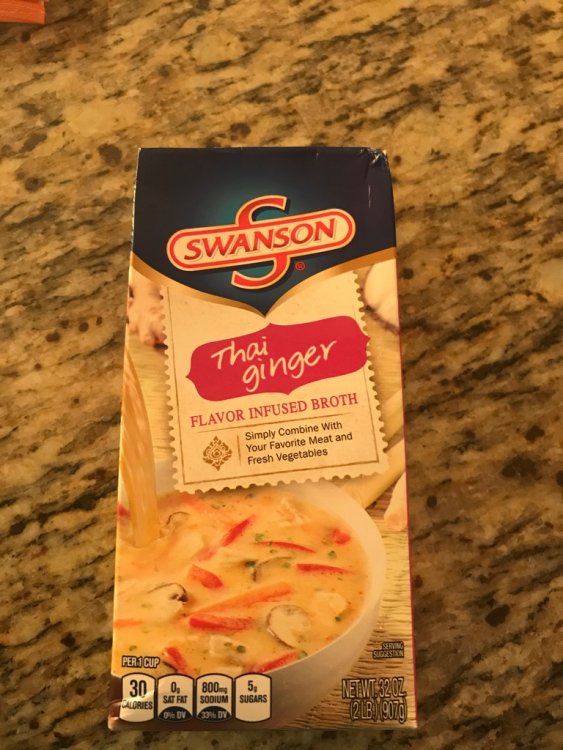
My surgery was on 4/19, came home on 4/21. Stopped by Publix to grab some broth, as it is allowed in the liquid diet, and discovered Thai Chicken infused broth. What a gem. Had to share. IMG_0952.JPG
  • Replies 8
  • Views 1.7k
  • Created
  • Last Reply

Featured Replies

There are a lot of other broth options that don't have sugar in them like this one.

You can just a regular broth, and add spices to it.

Whole Foods if you live near one has a wider variety of broths, with better nutritional values.

1 hour ago, Solar J said:

My surgery was on 4/19, came home on 4/21. Stopped by Publix to grab some broth, as it is allowed in the liquid diet, and discovered Thai chicken infused broth. What a gem. Had to share. IMG_0952.JPG

I LOVE this broth. I have no sugar or carbohydrate issues, so for me, it's like the holy grail when I find it on the shelf.

  • Author
How was your surgery I'm due to go on May 5th and I'm so nervous


This is first surgery I've had since my tonsils when I was a kid. I was nervous too, you must release yourself to your doctors and the program, the next thing you'll wake up in recovery on the path to a new life. Try to get creative with the liquid diet, make chocolate popsicles from Ensure, Gatorade ice cubes, and spice up the broth.


Archived

This topic is now archived and is closed to further replies.

Trending Products

PatchAid Vitamin Patches

Account

Navigation

Search

Search

Configure browser push notifications

Chrome (Android)
  1. Tap the lock icon next to the address bar.
  2. Tap Permissions → Notifications.
  3. Adjust your preference.
Chrome (Desktop)
  1. Click the padlock icon in the address bar.
  2. Select Site settings.
  3. Find Notifications and adjust your preference.