Skip to content
View in the app

A better way to browse. Learn more.

BariatricPal

A full-screen app on your home screen with push notifications, badges and more.

To install this app on iOS and iPadOS
  1. Tap the Share icon in Safari
  2. Scroll the menu and tap Add to Home Screen.
  3. Tap Add in the top-right corner.
To install this app on Android
  1. Tap the 3-dot menu (⋮) in the top-right corner of the browser.
  2. Tap Add to Home screen or Install app.
  3. Confirm by tapping Install.

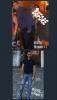
Before and after, 6 month out.

  • Replies 25
  • Views 2.1k
  • Created
  • Last Reply

Featured Replies

You look great!

@@leonelbreton

Looking healthy and lean. And rocking those jeans ;).

Good evening this is my before and after, 6 months after my surgery, I lose 113 pounds so far, good luck to all, this was the best decision of my life.

Sent from my iPhone using the BariatricPal App

Youre right. I cant really see the before pic of your face but babe, your after shot is banging. Youve been able to find some stylish jeans. Did you ever think you'd be wearing stylish jeans? Looking good

Sent from my SM-N920V using the BariatricPal App

Good evening this is my before and after, 6 months after my surgery, I lose 113 pounds so far, good luck to all, this was the best decision of my life.

Sent from my iPhone using the BariatricPal App

Wow. I'm a pre-op male on the 5th month of my diet. I certainly hope my post-op experience is as successful as yours. I'm amazed. Was it hard to do?

Wowza! Looking hot! [emoji12]

Good evening this is my before and after, 6 months after my surgery, I lose 113 pounds so far, good luck to all, this was the best decision of my life.

Sent from my iPhone using the BariatricPal App

Wow! 6 months - that's crazy! You look so good….

Muey caliente! Great job!

Archived

This topic is now archived and is closed to further replies.

Trending Products

PatchAid Vitamin Patches

Account

Navigation

Search

Search

Configure browser push notifications

Chrome (Android)
  1. Tap the lock icon next to the address bar.
  2. Tap Permissions → Notifications.
  3. Adjust your preference.
Chrome (Desktop)
  1. Click the padlock icon in the address bar.
  2. Select Site settings.
  3. Find Notifications and adjust your preference.