Skip to content
View in the app

A better way to browse. Learn more.

BariatricPal

A full-screen app on your home screen with push notifications, badges and more.

To install this app on iOS and iPadOS
  1. Tap the Share icon in Safari
  2. Scroll the menu and tap Add to Home Screen.
  3. Tap Add in the top-right corner.
To install this app on Android
  1. Tap the 3-dot menu (⋮) in the top-right corner of the browser.
  2. Tap Add to Home screen or Install app.
  3. Confirm by tapping Install.

Portable Protein Shake

  • Replies 11
  • Views 1.1k
  • Created
  • Last Reply

Featured Replies

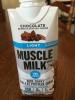
I bought these at costco trying to be cheap. I hate the flavor and should have just paid the extra $5.00 for the Premier Protein. Now I have 17 more of these to drink.. Icky! Lesson learned-stick with what you like.

Sent from my SAMSUNG-SM-N915A using the BariatricPal App

@Daniellewi: costco will take ANYTHING food wise back if you don't like it, even if you used up half. Just bring it back and say they were unpalatable, and you want Costco store credit to buy the ones you like.

They won't give you any trouble, I promise.

Sent from my iPad using the BariatricPal App

How do the muscle milk light taste? I love the taste of the regular one

Sent from my SM-G930T using the BariatricPal App

@Daniellewi: costco will take ANYTHING food wise back if you don't like it, even if you used up half. Just bring it back and say they were unpalatable, and you want Costco store credit to buy the ones you like.

They won't give you any trouble, I promise.

Sent from my iPad using the BariatricPal App

I did not know this, thanks!

Sent from my SM-T800 using the BariatricPal App

I like muscle milk, but the last few have had leaks

After opening the top seal leaks and I have had messes to clean up.

I reported to manufacturer, but no response

Sent from my iPhone using the BariatricPal App

Archived

This topic is now archived and is closed to further replies.

Trending Products

PatchAid Vitamin Patches

Account

Navigation

Search

Search

Configure browser push notifications

Chrome (Android)
  1. Tap the lock icon next to the address bar.
  2. Tap Permissions → Notifications.
  3. Adjust your preference.
Chrome (Desktop)
  1. Click the padlock icon in the address bar.
  2. Select Site settings.
  3. Find Notifications and adjust your preference.