Skip to content
View in the app

A better way to browse. Learn more.

BariatricPal

A full-screen app on your home screen with push notifications, badges and more.

To install this app on iOS and iPadOS
  1. Tap the Share icon in Safari
  2. Scroll the menu and tap Add to Home Screen.
  3. Tap Add in the top-right corner.
To install this app on Android
  1. Tap the 3-dot menu (⋮) in the top-right corner of the browser.
  2. Tap Add to Home screen or Install app.
  3. Confirm by tapping Install.

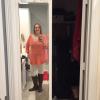
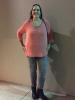
Woohoo! Down one more size!

  • Replies 11
  • Views 709
  • Created
  • Last Reply

Featured Replies

Looking great! Keep it up!

Fantastic! Will you look at those long legs!

I was not blessed in the length of limb department. I seem to have a lot of leggy friends.

@@kealot

You are a true inspiration. What you've done is an incredible feat and you deserve all the praise in the world!

Well done !!!!!!

  • Author

???? Thanks everyone! It has definitely been a journey!

  • Author

@@kealot you look amazing. I hope that I have the same outcome! I was sleeved Aug 19th, and only lost 30lbs. I really need to lose 100lbs. Did you exercise Kealot?

Thanks you! Yes I started exercising about 2 month after surgery. 30 lbs in a month is really good. It takes time to loose 100 lbs, but you can do it.

I love these kinds of posts and the beaming smiles that usually accompanies them!

Congrats! You look great! ????

Archived

This topic is now archived and is closed to further replies.

Trending Products

PatchAid Vitamin Patches

Account

Navigation

Search

Search

Configure browser push notifications

Chrome (Android)
  1. Tap the lock icon next to the address bar.
  2. Tap Permissions → Notifications.
  3. Adjust your preference.
Chrome (Desktop)
  1. Click the padlock icon in the address bar.
  2. Select Site settings.
  3. Find Notifications and adjust your preference.