Skip to content
View in the app

A better way to browse. Learn more.

BariatricPal

A full-screen app on your home screen with push notifications, badges and more.

To install this app on iOS and iPadOS
  1. Tap the Share icon in Safari
  2. Scroll the menu and tap Add to Home Screen.
  3. Tap Add in the top-right corner.
To install this app on Android
  1. Tap the 3-dot menu (⋮) in the top-right corner of the browser.
  2. Tap Add to Home screen or Install app.
  3. Confirm by tapping Install.

Rant about Commercial Posts

  • Popular Post

It seems to me like we are getting more and more commercial posts on the forum, and it's always from someone who has only 1,2, or 3 posts. The thing that bugs me is that I don't see the REPORT THIS option anymore.

  • Replies 13
  • Views 1.3k
  • Created
  • Last Reply

Featured Replies

The "Report" button is ghosted. Move the mouse just to the right of MultiQuote and it should light up. But you have to be signed in.

The report this option hasn't been removed. What device are you using to access our site? Please go ahead and report any spam or commercial posts. Most aren't authorized.

  • Author

Those are the ones where there is no questions, conversation or give-and-take about weight loss or bariatric surgery, just links to something an unidentified entity is selling or promoting.

If there is a "link" I don't click them as I am suspicious. The pattern is the same - the person has posted maybe once (or if multiple it is because they are spamming us) and includes a link with some vague sentence to go with it. Report em using the "report" button that can only be seen when you hover over it. Down at the bottom where it says "multiquote"... hover to the left and you will see it.

How do you report them from an iPad? Does anyone know?

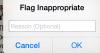
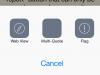
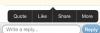
On the iPhone I touched the post, then instead of Quote or Edit I chose More. From there I chose Flag. Then I typed the reason Spam and pressed OK. post-208484-14307655921277_thumb.jpgpost-208484-1430765606052_thumb.jpgpost-208484-14307656167964_thumb.jpg

Is it bad that it annoys me that doctors now post threads? While sometimes their information is a little interesting, generally they post once or twice in the form of an article, largely because putting content on the Internet serves to increase their SEO score, particularly with backlinks from a reputable site like this. I understand the idea that they're doing business and at least the content has a point, but the majority of it is things that we already know and that is literally only posted as a post because it promotes the doctor's online standing and thus he or she returns higher on searches with certain key words, which are cleverly included in the article.

It's how the online marketing game works, it just feels very insincere, particularly when they don't bother to post anywhere else on the sight outside of promoting themselves. If someone has answered 50 questions and wants to promote themselves a little with a well researched article, ok cool, but to create a profile purely to post "information" with the motive of improving SEO, irks me.

@@AvaFern are you talking about what seem to be BP sanctioned articles by providers? I just wish they didn't show up as recent posts because I try to scan those and reply regularly.

My opinion about these articles are that they are fine but not particularly groundbreaking. Your comments about the keywords make sense and maybe explains why they are often so "light" on content

@@CowgirlJane

You may be right. Recently I saw several posts that were by doctors with literally one single post, that were included in the recent posts feed. Usually I see the ones sponsored by BP as being in the articles section and they are usually formatted differently (with bold headings and things that make them more formal), while the most recent ones I saw just looked like regular posts by doctors who thought it was a good idea to slap some content on the page. It is entirely possible though that they were sponsored content and I just didn't notice that.

Archived

This topic is now archived and is closed to further replies.

Trending Products

PatchAid Vitamin Patches

Account

Navigation

Search

Search

Configure browser push notifications

Chrome (Android)
  1. Tap the lock icon next to the address bar.
  2. Tap Permissions → Notifications.
  3. Adjust your preference.
Chrome (Desktop)
  1. Click the padlock icon in the address bar.
  2. Select Site settings.
  3. Find Notifications and adjust your preference.