Skip to content
View in the app

A better way to browse. Learn more.

BariatricPal

A full-screen app on your home screen with push notifications, badges and more.

To install this app on iOS and iPadOS
  1. Tap the Share icon in Safari
  2. Scroll the menu and tap Add to Home Screen.
  3. Tap Add in the top-right corner.
To install this app on Android
  1. Tap the 3-dot menu (⋮) in the top-right corner of the browser.
  2. Tap Add to Home screen or Install app.
  3. Confirm by tapping Install.

My itty bitty NSV

  • Popular Post

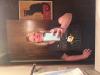
Although I despise pix of myself I included one just as proof! My NSV is walking into the employee store & being able to buy a large fitted tee & having it actually fit! A year ago I never would've worn this....mainly cause it would've fit better around one of my thighs then my core ;)

GO DUCKS!!!!post-212640-0-14691800-1421084064_thumb.jpg

  • Replies 4
  • Views 800
  • Created
  • Last Reply

Featured Replies

That's awesome! you look great! our stats are really similar, hope I have the same success in the next few months! Go Ducks!

NSV walking into the employee store & being able to buy a large fitted tee

@@Goonie

never minimize any successes story :)

every/any new experience - especially clothes related - are great!!

i hope you don't acquire neck problems like me :blink:

i have to turn my head sideways to see your nice pic, ouch :( :lol:

but, it, you are worth it ;)

94 lbs down, down, down!!!! :)

keep up the good work :)

kathy

congrats

Edited by proudgrammy

  • Author

That's funny! I'm sure you'll do great & probably much better results than me (way too many cookies during December). Anyhoo, grabbing stuff off the rack was a really great motivator for me! It's nice to not have to buy a men's duck tee shirt ;)

  • Author

Thank you, Kathy!

Maybe I look better sideways ;)....really I'm not sure how it posted that way as the file was right side up when shot & when I clicked on it it corrected itself....ahh, technology!

Archived

This topic is now archived and is closed to further replies.

Account

Navigation

Search

Search

Configure browser push notifications

Chrome (Android)
  1. Tap the lock icon next to the address bar.
  2. Tap Permissions → Notifications.
  3. Adjust your preference.
Chrome (Desktop)
  1. Click the padlock icon in the address bar.
  2. Select Site settings.
  3. Find Notifications and adjust your preference.