Skip to content
View in the app

A better way to browse. Learn more.

BariatricPal

A full-screen app on your home screen with push notifications, badges and more.

To install this app on iOS and iPadOS
  1. Tap the Share icon in Safari
  2. Scroll the menu and tap Add to Home Screen.
  3. Tap Add in the top-right corner.
To install this app on Android
  1. Tap the 3-dot menu (⋮) in the top-right corner of the browser.
  2. Tap Add to Home screen or Install app.
  3. Confirm by tapping Install.

Do you guys ever...

Eat too much at a meal and start to stress about stretchibg your sleeve out?? I'm so worried about that. I love my sleeve just the way it is and I'm worried that I'll go back. I'm only 8 weeks out, so I think I'm still learning this "full" thing. Tips?! I know one for me is to slow down... It's always been a fault of mine.

  • Replies 9
  • Views 906
  • Created
  • Last Reply

Featured Replies

No worries, Just always measure your food. nuf said. ;)

  • Popular Post

There is a business principle that goes something like this:

You cannot control that which you do not measure.

  • Popular Post

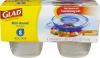
I bought a box of Gladware 1/2 cup containers early on. Fill one up and you know exactly how much I'm allowed to eat per meal. Around the 1 year mark, I moved up to a 1 cup container.

post-147109-0-78130800-1417325489_thumb.jpg

@@joatsaint

That is brilliant! I am buying those before I leave for Mexico!

  • Author

So you guys eat 1/2 cup of food at each meal?

  • Author

I just think that thanksgiving has been hard because there were so many foods I wanted to taste.

I agree with everyone who says to measure your food. I would like to add to eat slow, pausing between bites. Sometimes I can eat the measured amount and other times I can't. Tonight for dinner I had a pizza made with chicken breast for the crust. Usually I can eat a piece about the size of 2" x 3" but tonight I ate about half and got overfilled and almost threw up (because I wasn't eating slow enough to notice it was filling me up faster than normal).

But I do have those half cup containers and I'm totally going to take @@joatsaint advice and eat no more than that at each meal. Great idea!

I have always loved food. But I find it easier to not over eat if I just tell myself I can have it tomorrow. I sometimes eat the left overs meal after meal until I want something else. It always helps that after thanksgiving dinner I premeasure everything as I am putting it away. If you deny yourself you often lose.

I always measure my food and 4 oz is my limit, although I can handle a bit more if it's Soup. For me, weight seems a bit more accurate judge of my new tummy's capacity more than measuring by volume.

You'll never be able to stretch your sleeve back to your original stomach's fully-stretched size. However, if you want to keep your sleeve as tight as possible, then concentrate on when you start to feel full and then stop eating. Your sleeve will stretch out a bit over the year due to healing. That doesn't mean you're doing anything wrong. I actually wish my sleeve would always stay at this 1/2 cup level, but even 1 cup is better than the 4+ cups I could eat before surgery.

Just remember what you eat is a choice you're making. Try not to think of food as "I can and can't" but as "I choose or not choose." If you choose to try a little of everything at Thanksgiving, then do it, but choose to keep the portions reasonable to your sleeve size. Then go back to your regular menu after the holiday. You're not punishing yourself, but learning to change your relationship with food.

I'm rather a creature of habit, so I choose not to indulge just yet. There will be many holidays to come!

Best of luck on your journey!

Edited by AlwaysVegas

Archived

This topic is now archived and is closed to further replies.

Trending Products

PatchAid Vitamin Patches

Account

Navigation

Search

Search

Configure browser push notifications

Chrome (Android)
  1. Tap the lock icon next to the address bar.
  2. Tap Permissions → Notifications.
  3. Adjust your preference.
Chrome (Desktop)
  1. Click the padlock icon in the address bar.
  2. Select Site settings.
  3. Find Notifications and adjust your preference.