Skip to content
View in the app

A better way to browse. Learn more.

BariatricPal

A full-screen app on your home screen with push notifications, badges and more.

To install this app on iOS and iPadOS
  1. Tap the Share icon in Safari
  2. Scroll the menu and tap Add to Home Screen.
  3. Tap Add in the top-right corner.
To install this app on Android
  1. Tap the 3-dot menu (⋮) in the top-right corner of the browser.
  2. Tap Add to Home screen or Install app.
  3. Confirm by tapping Install.

Portion Control

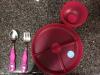
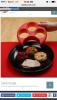
My pre-op diet starts in a few days and it allows for one meal a day and 2 protein drinks so I picked this little guy up on Amazon.compost-236891-14136478452834_thumb.jpg
  • Replies 5
  • Views 665
  • Created
  • Last Reply

Featured Replies

It still looks like big portions....optical illusion perhaps. But I like it

  • Author

It may be a little big for post-op but not pre-op or down the road when you can eat more

I love that however I'm 20 days post op and couldn't imagine eating all that at once for a long while. Not even in a day. Maybe about 6 months out but I still think it would be a bit much for my misses. Lol.

It looks healthy!!

Archived

This topic is now archived and is closed to further replies.

Trending Products

PatchAid Vitamin Patches

Account

Navigation

Search

Search

Configure browser push notifications

Chrome (Android)
  1. Tap the lock icon next to the address bar.
  2. Tap Permissions → Notifications.
  3. Adjust your preference.
Chrome (Desktop)
  1. Click the padlock icon in the address bar.
  2. Select Site settings.
  3. Find Notifications and adjust your preference.