




1 year post op
- Replies 4
- Views 934
- Created
- Last Reply
Top Posters In This Topic
-
BigGirlPanties 1 post
-
val326 1 post
-
Dexter1118 1 post
-
BrownsBacker39 1 post




Popular Days
Posted Images
Featured Replies
Join the conversation
You can post as a guest; create a free account to track replies, follow topics, and be part of the largest weight loss surgery community.
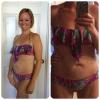
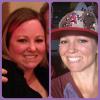
I my name is Natalie and I had the Sleeve on 6/4/13 and it has changed my life (for the better)!! When I started I was 200 lbs and currently 124-125 most days. I had HTN and Thyroid issues and sleep apnea which I no longer have any health problems. I get called "thin" which has NEVER happened before, I still go to the "big girl" section of the store not even thinking about it. I'm wearing a size Small sometimes XS, my goal was to fit in a Small scrubs and I'm in XS.. It's still mind blowing to me that my life has changed so drastically. I have been this size for about 3 months. I'm able to eat everything except bread (I really choose not to) it makes me too full. So this Summer I'm attempting a 2piece, can't even remember the last time I bought a 2 piece! This was the best decision I have ever made before and would do it again in a heartbeat!