Skip to content
View in the app

A better way to browse. Learn more.

BariatricPal

A full-screen app on your home screen with push notifications, badges and more.

To install this app on iOS and iPadOS
  1. Tap the Share icon in Safari
  2. Scroll the menu and tap Add to Home Screen.
  3. Tap Add in the top-right corner.
To install this app on Android
  1. Tap the 3-dot menu (⋮) in the top-right corner of the browser.
  2. Tap Add to Home screen or Install app.
  3. Confirm by tapping Install.

6 month update

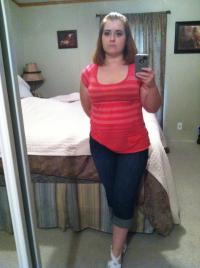
Weight DOS 335, highest was 375. Today I am 217 down 118 since my surgery 12/03/13. Lost all my health issues...no more type 2 diabetes, no more obstructive sleep apnea...I added years to my life by making the greatest decision of my life!

post-199224-0-72153800-1403114218_thumb.jpg

  • Replies 12
  • Views 1.6k
  • Created
  • Last Reply

Featured Replies

Not related to topic but I love your sleeves!!! And Congrats on your weightloss!!!

  • Author

Thanks lilboo :-)

Edited by Brian718

That's great!

Congratulations......

Congratulations !!!

  • Author

Thanks guys!!!!

Way to go!

Congratulations, you look awesome!!!

That's amazing! Keep up the great work. I know how difficult sleep apnea can be to live with. My husband has it and is having nasal surgery because his is not caused by obesity. I love to hear about people getting rid of health problems after surgery.

Take care,

Kat

  • Author

Thanks again everyone :-) it feels good to have support and it def feels good to "live" again!!!

Archived

This topic is now archived and is closed to further replies.

Trending Products

PatchAid Vitamin Patches

Account

Navigation

Search

Search

Configure browser push notifications

Chrome (Android)
  1. Tap the lock icon next to the address bar.
  2. Tap Permissions → Notifications.
  3. Adjust your preference.
Chrome (Desktop)
  1. Click the padlock icon in the address bar.
  2. Select Site settings.
  3. Find Notifications and adjust your preference.