Skip to content
View in the app

A better way to browse. Learn more.

BariatricPal

A full-screen app on your home screen with push notifications, badges and more.

To install this app on iOS and iPadOS
  1. Tap the Share icon in Safari
  2. Scroll the menu and tap Add to Home Screen.
  3. Tap Add in the top-right corner.
To install this app on Android
  1. Tap the 3-dot menu (⋮) in the top-right corner of the browser.
  2. Tap Add to Home screen or Install app.
  3. Confirm by tapping Install.

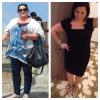
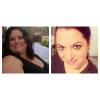
8 month progress pic

My sure I should have somethig with my body but I can't get over my face at the moment. This was exactly 3 years ago. HW 255 surgery weight 241 and this am 166! 89!!! I've lost a super model

post-174871-0-59033500-1393960401_thumb.jpg

  • Replies 24
  • Views 4k
  • Created
  • Last Reply

Featured Replies

MIss Joy you are a living example of keep going and it will work. congratulations on your hard work, looking happy and beautiful too!

  • 2 months later...

Found a full length one

I LOVE those shoes! Do you mind sharing the details on them?

  • Author

I LOVE those shoes! Do you mind sharing the details on them?

They are valantino knock offs LOL. Called revel and they are always on gilte group. They are aooo comfy!

Thanks! I love shoes and love a good deal on cute shoes!

So awesome and you look great!!!

Awesome job!!!!! You look beautiful

You look fantastic and have always been beautiful. Congrats on the healthier you.

Archived

This topic is now archived and is closed to further replies.

Trending Products

PatchAid Vitamin Patches

Account

Navigation

Search

Search

Configure browser push notifications

Chrome (Android)
  1. Tap the lock icon next to the address bar.
  2. Tap Permissions → Notifications.
  3. Adjust your preference.
Chrome (Desktop)
  1. Click the padlock icon in the address bar.
  2. Select Site settings.
  3. Find Notifications and adjust your preference.