Skip to content
View in the app

A better way to browse. Learn more.

BariatricPal

A full-screen app on your home screen with push notifications, badges and more.

To install this app on iOS and iPadOS
  1. Tap the Share icon in Safari
  2. Scroll the menu and tap Add to Home Screen.
  3. Tap Add in the top-right corner.
To install this app on Android
  1. Tap the 3-dot menu (⋮) in the top-right corner of the browser.
  2. Tap Add to Home screen or Install app.
  3. Confirm by tapping Install.

Progress pic

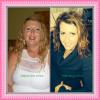
Hi everyone. I thought I'd check in with a progress pic. I was sleeved 9/9/2013 SW was 262 and current weight is 200.6. Sooooo close to onederland....very exciting! Good luck to those who have been recently sleeved and to those who are still waiting....it is so worth it! No regrets by far.

Not the best pictures, but the best I have right now :)

post-175186-0-65630800-1392233974_thumb.jpg

  • Replies 11
  • Views 1.7k
  • Created
  • Last Reply

Featured Replies

You look great! Keep up the good work :)

Very pretty.

Wow what a difference!! Congrats!!

Wow! You have definately found the fountain of youth! You look so much younger! Gorgeous!

Woohoo! You look terrific Bailey!!! Congrats!!!

Congrats! I bet you feel great!

WOW!!! Looking awesome!

  • Author

Thanks so much! Your encouragement really means a lot! Not at goal yet but I'm getting there :)

Wow! So exciting! You are almost there!

You look great! U will be there soon!

Archived

This topic is now archived and is closed to further replies.

Trending Products

PatchAid Vitamin Patches

Account

Navigation

Search

Search

Configure browser push notifications

Chrome (Android)
  1. Tap the lock icon next to the address bar.
  2. Tap Permissions → Notifications.
  3. Adjust your preference.
Chrome (Desktop)
  1. Click the padlock icon in the address bar.
  2. Select Site settings.
  3. Find Notifications and adjust your preference.