Skip to content
View in the app

A better way to browse. Learn more.

BariatricPal

A full-screen app on your home screen with push notifications, badges and more.

To install this app on iOS and iPadOS
  1. Tap the Share icon in Safari
  2. Scroll the menu and tap Add to Home Screen.
  3. Tap Add in the top-right corner.
To install this app on Android
  1. Tap the 3-dot menu (⋮) in the top-right corner of the browser.
  2. Tap Add to Home screen or Install app.
  3. Confirm by tapping Install.

7mths out!

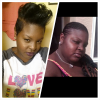
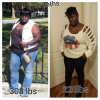
Its been 7 mths started at 308 cw 226 cant wait to get out the 200s

post-176403-0-10636200-1388121796_thumb.png

[ATTACH]39154[/ATTACH]

post-176403-0-10636200-1388121796_thumb.png

[ATTACH]39154[/ATTACH]

  • Replies 12
  • Views 1.2k
  • Created
  • Last Reply

Featured Replies

Congrats on your accomplishment! Before u know it..u will be in the onderland.

You look great! Congratulations.

Wow! I can definitely see a difference. It must feel so good to be making steady progress toward your goal. Keep up the good work (I also like the new hair style. Very chic)

  • Author

Thanks guys its a journey its sure no easy but its worth it

You are looking fabulous!! :)

  • 3 weeks later...
  • Author

Still cant believe I was so big

post-176403-0-28329100-1389723978_thumb.png

[ATTACH]40315[/ATTACH]

I swear I look almost exactly like you do in your before pics. Same curves and figure. I can only hope to do as well as you have. You look amazing!

April

  • Author

I swear I look almost exactly like you do in your before pics. Same curves and figure. I can only hope to do as well as you have. You look amazing!

April

Ur gonna do great I need to get back on track I been slacking

  • Author

Looking good. Congrats your doing great!

Thank u

Archived

This topic is now archived and is closed to further replies.

Trending Products

PatchAid Vitamin Patches

Account

Navigation

Search

Search

Configure browser push notifications

Chrome (Android)
  1. Tap the lock icon next to the address bar.
  2. Tap Permissions → Notifications.
  3. Adjust your preference.
Chrome (Desktop)
  1. Click the padlock icon in the address bar.
  2. Select Site settings.
  3. Find Notifications and adjust your preference.