




Updated Pics
- Replies 3
- Views 714
- Created
- Last Reply
Top Posters In This Topic
-
kll724 1 post
-
fashionstylist 1 post
-
Bandista 1 post



Popular Days
Most Popular Posts
-
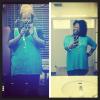
Oh my goodness, you look so happy and healthy -- gorgeous! Thanks for the inspiration. The exercise really shows as you are not only much smaller but beautifully toned as well. That is my goal. Be
-
Thanks you so much! I'm still tying to figure it out. On thing I don't want is sagging skin. But nothing I'm stressing about !
Posted Images


Featured Replies
Join the conversation
You can post as a guest; create a free account to track replies, follow topics, and be part of the largest weight loss surgery community.
Well today marks one year that I have been registered on here! I can't believe I have started this journey a year ago. How funny how time flies. Today I am down 57 lbs from my first pre op visit but a total of 66 lbs from my highest weight this year.
I am now working out faithfully 4-6 times a week at 5 am in the morning. I walk faster, I have more energy, I'm loving the way my clothes look on me. Just a huge transformation!
Highest Weight May 2013: 331 lbs
Pre-Op Weight: 319
Day of Surgery: 306
Current Weight : 266
PreOp Size: 26W
Current Size:14/16 W