Skip to content
View in the app

A better way to browse. Learn more.

BariatricPal

A full-screen app on your home screen with push notifications, badges and more.

To install this app on iOS and iPadOS
  1. Tap the Share icon in Safari
  2. Scroll the menu and tap Add to Home Screen.
  3. Tap Add in the top-right corner.
To install this app on Android
  1. Tap the 3-dot menu (⋮) in the top-right corner of the browser.
  2. Tap Add to Home screen or Install app.
  3. Confirm by tapping Install.

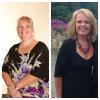
One year.101lbs down!

Loving life! The BEST thing I've ever done. The resources and advice I've gotten on this board have been instrumental and I thank you all! About 7-8lbs more to go to hit goal and give myself a couple pound buffer but I know it will happen.

Thanks again!

post-37083-13838396811773_thumb.jpg

  • Replies 11
  • Views 1.4k
  • Created
  • Last Reply

Featured Replies

gorgeous

amazing!!!! Congratulations!

Congratulations you look fantastic!

Congratulations, you look great! I like reading success stories like yours. Gives me hope.

Congrats - you look great and love your smile.

Wow you look fantastic !!! I have 14 more lbs until onederland :)

Sent from my iPhone using VST

Congrats!! You look beautiful!

You look fantastic! Congrats!

Thanks for sharing your pics.

You look awesome and much younger. Congrats to you!!!

Archived

This topic is now archived and is closed to further replies.

Trending Products

PatchAid Vitamin Patches

Account

Navigation

Search

Search

Configure browser push notifications

Chrome (Android)
  1. Tap the lock icon next to the address bar.
  2. Tap Permissions → Notifications.
  3. Adjust your preference.
Chrome (Desktop)
  1. Click the padlock icon in the address bar.
  2. Select Site settings.
  3. Find Notifications and adjust your preference.