Skip to content
View in the app

A better way to browse. Learn more.

BariatricPal

A full-screen app on your home screen with push notifications, badges and more.

To install this app on iOS and iPadOS
  1. Tap the Share icon in Safari
  2. Scroll the menu and tap Add to Home Screen.
  3. Tap Add in the top-right corner.
To install this app on Android
  1. Tap the 3-dot menu (⋮) in the top-right corner of the browser.
  2. Tap Add to Home screen or Install app.
  3. Confirm by tapping Install.

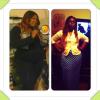
10 weeks Post Op Pic :)

DOS 294

Today 250.2 YaY ????

post-29236-13813811743308_thumb.jpg

  • Replies 17
  • Views 1.6k
  • Created
  • Last Reply

Featured Replies

DOS 294

Today 250.2 YaY dde1d

Wow u look great! Big difference!!!

  • Author

Wow u look great! Big difference!!!

Thanks so much!!! This is the first time I actually see a difference!!

  • Author
Beautiful!

Thank yoooooou!!!

  • Author
Lisa you look great! Way to go!

Thanks a bunch ????

your looking really really good keep it up!!!! Lots of love

Gorgeous, Lisa!!! I just did the same type of collage using Instagram, and I, too, can only now see the difference in myself. You look fantastic!

WOW! 44 pounds in 10 weeks! You must feel so proud! You look great!

  • Author

omg thanks sooooooo much ladies you all don't know how much those words mean to me...I don't have a major support system at home and it just feels so wonderful to have that support here ya know? You guys are so encouraging and love you for that!!!

To my Sister @Cat please upload so I can see I know youre doing phenomenal!!

How on earth do I post a pic? Do I have to upload it to somewhere in my profile first?

  • Author

are you using your phone? If so there should be a + option when replying or starting a thread where you can add a pic...if youre using the computer I have no clue lol

Ok, I figured it out. It's called "scroll to the bottom and see ATTACHMENTS!" I just posted a couple of pics. :-)

You look amazing congrats!

  • Author
You look amazing congrats!

Thanks a lot Blue!!!

Archived

This topic is now archived and is closed to further replies.

Trending Products

PatchAid Vitamin Patches

Account

Navigation

Search

Search

Configure browser push notifications

Chrome (Android)
  1. Tap the lock icon next to the address bar.
  2. Tap Permissions → Notifications.
  3. Adjust your preference.
Chrome (Desktop)
  1. Click the padlock icon in the address bar.
  2. Select Site settings.
  3. Find Notifications and adjust your preference.