Skip to content
View in the app

A better way to browse. Learn more.

BariatricPal

A full-screen app on your home screen with push notifications, badges and more.

To install this app on iOS and iPadOS
  1. Tap the Share icon in Safari
  2. Scroll the menu and tap Add to Home Screen.
  3. Tap Add in the top-right corner.
To install this app on Android
  1. Tap the 3-dot menu (⋮) in the top-right corner of the browser.
  2. Tap Add to Home screen or Install app.
  3. Confirm by tapping Install.
  • Appearance

Join BariatricPal free

  • Ask your own questions
  • Reply and follow topics
  • Message other members
  • No cost, no spam

Belly button owie

Okay...I don't want to sound like a baby,but my belly button has an owie. One of the incisions is right above my belly button. It's been over a month and it still hasn't healed. My waistband rubs on it and causes it to be sore. I've tried putting a bandaid or gauze on it to pad it, but it just won't heal. Has anyone else had this problem?

  • Replies 4
  • Views 684
  • Created
  • Last Reply

Top Posters In This Topic

Posted Images

Featured Replies

Call your doc. You do not want it to get infected.

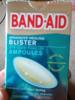
I had that with my side one. I cleaned it with perixide and then would put the thick brown (corn pad protector) band aide on. Then I would change it once weekly. It is the same as a duoderm. My side one ended up healing the best out of all of mine now.

Mine took a while to heal too but I was cut into twice so it was a little bigger. Actually, I was fighting with it about two months because I the dress pants I wore for work. The darn button was right there. I finally had to cover mine as well and used a little Neosporin.

And yes, if it is red, puffy or ‘hot’ call your Dr immediately so you don’t get an infection.

Join the conversation

You can post as a guest; create a free account to track replies, follow topics, and be part of the largest weight loss surgery community.

Join the conversation

You can post now and register later. If you have an account, sign in now to post with your account.

Guest
Reply to this topic...

Account

Navigation

Search

Search

Configure browser push notifications

Chrome (Android)
  1. Tap the lock icon next to the address bar.
  2. Tap Permissions → Notifications.
  3. Adjust your preference.
Chrome (Desktop)
  1. Click the padlock icon in the address bar.
  2. Select Site settings.
  3. Find Notifications and adjust your preference.