Skip to content
View in the app

A better way to browse. Learn more.

BariatricPal

A full-screen app on your home screen with push notifications, badges and more.

To install this app on iOS and iPadOS
  1. Tap the Share icon in Safari
  2. Scroll the menu and tap Add to Home Screen.
  3. Tap Add in the top-right corner.
To install this app on Android
  1. Tap the 3-dot menu (⋮) in the top-right corner of the browser.
  2. Tap Add to Home screen or Install app.
  3. Confirm by tapping Install.

Not Execrising

Is anyone failing at exercising? I can resist all the food in the world and completely not eat if I had too, but I can not find the energy to exercise.... :(

Sent from my iPhone using RNYTalk

  • Replies 20
  • Views 1.8k
  • Created
  • Last Reply

Featured Replies

I used to be that way; now I need to have my workout in as much as I need to eat! You have to find something that you like...there are a lot of things out there to do...walking the mall like Worm2872 said is fine...but you need to remember many of you are new at this...this is the time that you need to set your good habits in motions...repitition becomes habit...I started walking' date=' then had my Ipod set up with music I love to listen to, I told myself that I would walk 3 of my favoirites and be done...the next thing you know your are doing three more to add to it and so the next thing is you have gone three miles and never realized it! Water areobics are great for newbies...low impact something to do at you own pace...I now run three miles every other day and cycle two days a week and bellydance for the fun workout!

The one thing I always do is drink!!! Dehydration for us is a real serious problem, I sip something every fifteen minutes...for those of you that are having a difficult time, I understand...I have been there...a trip to the hospital is a lot more expensive than a bottle of water...I carry a little soft cooler in my car packed with water, Protein shakes and healthy Snacks...

In my first weeks post-op I used to set a timer for 15 minutes and take a fews sips when the timer went off...I also put the timer in a place I would have to get up to get it and turn it off...

You guys can do it!!! Believe in yourself, remember why you had this life changing surgery...to change your life...get out there and live life!!

Hugs,

L[/quote']

Great info. Thank u for sharing!!

  • Author
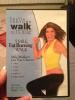
Leslie Sansone has some great workout videos all centered around walking. This one in the pic I've had for about two years. It's a total of five miles but broken into 1 mile segments so you can work your way up.

...and you don't need much space.

Sent from my iPhone using RNYTalk

I use to have her walk a mile DVD.. Does this really work?? Have people list weight doing it?

Sent from my iPhone using RNYTalk

My friend's mother had A few of her videos and she did lose weight. Not a lot though. It's just enough to keep you moving when you don't feel like going all out. The intensity gets higher as you work through the segments.

Sent from my iPhone using RNYTalk

I like gadgets, I use a bluetooth heart rate monitor, my iPhone and the digifit app to keep me goin. It has graphs and calories and all kinda cool stuff. The best part its helps keep me motivated to do it...

I like gadgets' date=' I use a bluetooth heart rate monitor, my iPhone and the digifit app to keep me goin. It has graphs and calories and all kinda cool stuff. The best part its helps keep me motivated to do it...[/quote']

Of you like gadgets, have you checked out the Nike+FuelBand? It tracks your daily activity and you can set goals. I'll think I'll make that my Christmas gift to myself. I've been good.

Here's the link:

http://www.nike.com/us/en_us/lp/nikeplusfuelband

Sent from my iPhone using RNYTalk

Archived

This topic is now archived and is closed to further replies.

Trending Products

PatchAid Vitamin Patches

Account

Navigation

Search

Search

Configure browser push notifications

Chrome (Android)
  1. Tap the lock icon next to the address bar.
  2. Tap Permissions → Notifications.
  3. Adjust your preference.
Chrome (Desktop)
  1. Click the padlock icon in the address bar.
  2. Select Site settings.
  3. Find Notifications and adjust your preference.