Skip to content
View in the app

A better way to browse. Learn more.

BariatricPal

A full-screen app on your home screen with push notifications, badges and more.

To install this app on iOS and iPadOS
  1. Tap the Share icon in Safari
  2. Scroll the menu and tap Add to Home Screen.
  3. Tap Add in the top-right corner.
To install this app on Android
  1. Tap the 3-dot menu (⋮) in the top-right corner of the browser.
  2. Tap Add to Home screen or Install app.
  3. Confirm by tapping Install.

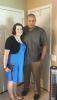
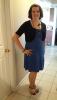
After pic!

Headed out to wedding tonight with the hubby! :)

We both got sleeved and I'm down 80 pounds and my husband is down 105 pounds! A whole new life best decision EVER!! :)

post-58694-13813668961613_thumb.jpg

post-58694-13813668962197_thumb.jpg

  • Replies 6
  • Views 998
  • Created
  • Last Reply

Featured Replies

Congrats! You both look great!

Sent from my iPhone using VST

You look amazing - what a great incentive! Congratulations!

How amazing you look! Awesome job :)

I'm down 80 pounds and my husband is down 105 pounds! A whole new life :)

Julie G T

I always am in such awe when i see spouses/siblings/family getting sleeved together :)

support you give each other is invalueable :)

it must be wonderful with your weight loss

you've both done so amazing with your weight loss :)

keep up the good job :)

kathy

congrats

Archived

This topic is now archived and is closed to further replies.

Trending Products

PatchAid Vitamin Patches

Account

Navigation

Search

Search

Configure browser push notifications

Chrome (Android)
  1. Tap the lock icon next to the address bar.
  2. Tap Permissions → Notifications.
  3. Adjust your preference.
Chrome (Desktop)
  1. Click the padlock icon in the address bar.
  2. Select Site settings.
  3. Find Notifications and adjust your preference.