Skip to content
View in the app

A better way to browse. Learn more.

BariatricPal

A full-screen app on your home screen with push notifications, badges and more.

To install this app on iOS and iPadOS
  1. Tap the Share icon in Safari
  2. Scroll the menu and tap Add to Home Screen.
  3. Tap Add in the top-right corner.
To install this app on Android
  1. Tap the 3-dot menu (⋮) in the top-right corner of the browser.
  2. Tap Add to Home screen or Install app.
  3. Confirm by tapping Install.

I started crying

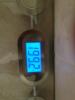
I started crying this morning when I saw this!! I can't remember weight below 200!!! Maybe 15 years ago before I got pregnant with my second daughter and tomorrow I will be 6 months post op !!!!

post-48279-13813667917905_thumb.jpg

  • Replies 13
  • Views 1.9k
  • Created
  • Last Reply

Featured Replies

Congratulations!! ;)

Awesome!

Congratulations! I totally relate! This is a wonderful journey!

Congrats....can't wait until I am in onederland! :)

Congrats! I got 19lbs to go. I got into a size 16 jeans today! Yea for us

Sent from my iPhone using VST

Awesome & Congrats!

Excellent! :-)

That's awesome! I will be there soon and can't wait

How cool! AND 1992 is the year I graduated HS! Which means nothing to you, but.... you're doing awesome!

(go pirates.)

Congrats!

amazing good job! I'm so excited for you. I can't wait to get there - 25lbs to go for me :)

Archived

This topic is now archived and is closed to further replies.

Trending Products

PatchAid Vitamin Patches

Account

Navigation

Search

Search

Configure browser push notifications

Chrome (Android)
  1. Tap the lock icon next to the address bar.
  2. Tap Permissions → Notifications.
  3. Adjust your preference.
Chrome (Desktop)
  1. Click the padlock icon in the address bar.
  2. Select Site settings.
  3. Find Notifications and adjust your preference.