Skip to content
View in the app

A better way to browse. Learn more.

BariatricPal

A full-screen app on your home screen with push notifications, badges and more.

To install this app on iOS and iPadOS
  1. Tap the Share icon in Safari
  2. Scroll the menu and tap Add to Home Screen.
  3. Tap Add in the top-right corner.
To install this app on Android
  1. Tap the 3-dot menu (⋮) in the top-right corner of the browser.
  2. Tap Add to Home screen or Install app.
  3. Confirm by tapping Install.

noticing a difference

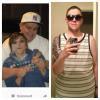
Have been really hard on myself cause I didn't see a difference yeah clothes are falling off but until I put these pics side by side I can say I am proud of myself even gotta admit I'm getting kinda cute now haha

post-47899-13813665403461_thumb.jpg

12-2612

Starting weight 391

Weight surgery day 340

Today 256

  • Replies 7
  • Views 753
  • Created
  • Last Reply

Featured Replies

I'm amazed that it has taken you this long to feel a difference! It's clear that you've lost a TON of weight in those pictures!! Keep up the good work.

  • Author
I'm amazed that it has taken you this long to feel a difference! It's clear that you've lost a TON of weight in those pictures!! Keep up the good work.

Looking into the mirror every morning you don't see a difference lol

Lookin good!!!!

You look great! Good job

Looking into the mirror every morning you don't see a difference lol

That's so true! You look great and I can most def see the difference! Good job!

Have been really hard on myself cause I didn't see a difference yeah clothes are falling off but until I put these pics side by side I can say I am proud of myself even gotta admit I'm getting kinda cute now haha

post-220150-13813139421887_thumb.jpg

12-2612

Starting weight 391

Weight surgery day 340

Today 256

That's awesome! Keep up the great work. Yeah, it's hard to see it in ourselves sometimes, that's why I truly appreciate when others notice also!

Archived

This topic is now archived and is closed to further replies.

Trending Products

PatchAid Vitamin Patches

Account

Navigation

Search

Search

Configure browser push notifications

Chrome (Android)
  1. Tap the lock icon next to the address bar.
  2. Tap Permissions → Notifications.
  3. Adjust your preference.
Chrome (Desktop)
  1. Click the padlock icon in the address bar.
  2. Select Site settings.
  3. Find Notifications and adjust your preference.