Skip to content
View in the app

A better way to browse. Learn more.

BariatricPal

A full-screen app on your home screen with push notifications, badges and more.

To install this app on iOS and iPadOS
  1. Tap the Share icon in Safari
  2. Scroll the menu and tap Add to Home Screen.
  3. Tap Add in the top-right corner.
To install this app on Android
  1. Tap the 3-dot menu (⋮) in the top-right corner of the browser.
  2. Tap Add to Home screen or Install app.
  3. Confirm by tapping Install.

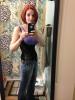
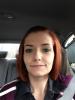
100 lbs gone! :)

  • Replies 13
  • Views 1.4k
  • Created
  • Last Reply

Featured Replies

Yay YOU!! Congratulations!

Way to go girl! I was sleeved 3 days after you. You have done a great job, but we need to see a before picture to compare it to.

Sent from Gaye's iPad Mini using VST

congrats! Are you at your goal weight now?

lynda

So happy for ur success! Congrats.

  • Author
congrats! Are you at your goal weight now?

lynda

I don't know lol. I honestly haven't really been trying to lose so much since about 40lbs. My original goal was 150 lbs. web md says my healthy weight range is 111-150 lbs. I don't want to get a whole lot smaller though!

Wonderful!!!!!!

wow good job... you are seriously tiny now lol.

Give us noobs some tips. Whats your daily diet looking like. How many cal/carbs/protein.

thanks

Archived

This topic is now archived and is closed to further replies.

Trending Products

PatchAid Vitamin Patches

Account

Navigation

Search

Search

Configure browser push notifications

Chrome (Android)
  1. Tap the lock icon next to the address bar.
  2. Tap Permissions → Notifications.
  3. Adjust your preference.
Chrome (Desktop)
  1. Click the padlock icon in the address bar.
  2. Select Site settings.
  3. Find Notifications and adjust your preference.