Skip to content
View in the app

A better way to browse. Learn more.

BariatricPal

A full-screen app on your home screen with push notifications, badges and more.

To install this app on iOS and iPadOS
  1. Tap the Share icon in Safari
  2. Scroll the menu and tap Add to Home Screen.
  3. Tap Add in the top-right corner.
To install this app on Android
  1. Tap the 3-dot menu (⋮) in the top-right corner of the browser.
  2. Tap Add to Home screen or Install app.
  3. Confirm by tapping Install.

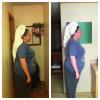
1 month on 3/11 - progress pic!

Pretty excited to see a difference. Would like for you guys to see as well.

Height 5' 7

SW- 275lbs

CW- 245lbs today! Ahhhh

That's 30lbs in almost a month!

post-43039-13813663713179_thumb.jpg

  • Replies 7
  • Views 763
  • Created
  • Last Reply

Featured Replies

Congratulations.....

Congrats! Keep up the good work. Looking good:)

  • Author

Thanks guys! I know it's not a huge difference but it sure does feel a lot better :)

Just think..that is 30 pounds you don't have to carry every day!

Wow that's a huge difference. You look great. Keep up the great work and make sure you hit the gym to tone up.

  • Author

Oh yeah, toning away. I have been hitting the gym 3-4 times a week since my first week post op :). Thanks for the compliments guys.

Archived

This topic is now archived and is closed to further replies.

Trending Products

PatchAid Vitamin Patches

Account

Navigation

Search

Search

Configure browser push notifications

Chrome (Android)
  1. Tap the lock icon next to the address bar.
  2. Tap Permissions → Notifications.
  3. Adjust your preference.
Chrome (Desktop)
  1. Click the padlock icon in the address bar.
  2. Select Site settings.
  3. Find Notifications and adjust your preference.