Skip to content
View in the app

A better way to browse. Learn more.

BariatricPal

A full-screen app on your home screen with push notifications, badges and more.

To install this app on iOS and iPadOS
  1. Tap the Share icon in Safari
  2. Scroll the menu and tap Add to Home Screen.
  3. Tap Add in the top-right corner.
To install this app on Android
  1. Tap the 3-dot menu (⋮) in the top-right corner of the browser.
  2. Tap Add to Home screen or Install app.
  3. Confirm by tapping Install.

Two Month Pics

  • Popular Post

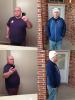
Don't be too harsh lol. I know the hat looks goofy.

Sleeved: 12/31/2012 - 297lbs

Updated Pic: 2/28/13 - 261lbs

post-34092-13813663550595_thumb.jpg

  • Replies 24
  • Views 2.4k
  • Created
  • Last Reply

Featured Replies

Wow, those are quite the progression pics. You must be proud of yourself.

You look great!

Looking great! So much progress in two months!

Awesome stuff man!

You look great, the hat is not goofy.

Looking good! Amazing what two months can do! Congrats keep it up!

Sent from my iPhone using VST

Yep, I can see a big difference. But you're developing a bit of an accent. :o

post-46516-13813663552057_thumb.jpg

Don't be too harsh lol. I know the hat looks goofy.

Sleeved: 12/31/2012 - 297lbs

Updated Pic: 2/28/13 - 261lbs

Damn I like the hat. You're looking hot. Seriously.

  • Author

Thank you everyone... I really appreciate the compliments. I didn't really think you could tell a difference until I put the pics side by side to see before I posted it. It's crazy how the mind plays tricks on you.

  • Author

Yep, I can see a big difference. But you're developing a bit of an accent. :o

post-46516-13813663552057_thumb.jpg

Gracias. Me gustan latinas, asi que es bueno.

(my spanish is probably a little off).

Archived

This topic is now archived and is closed to further replies.

Trending Products

PatchAid Vitamin Patches

Account

Navigation

Search

Search

Configure browser push notifications

Chrome (Android)
  1. Tap the lock icon next to the address bar.
  2. Tap Permissions → Notifications.
  3. Adjust your preference.
Chrome (Desktop)
  1. Click the padlock icon in the address bar.
  2. Select Site settings.
  3. Find Notifications and adjust your preference.