Skip to content
View in the app

A better way to browse. Learn more.

BariatricPal

A full-screen app on your home screen with push notifications, badges and more.

To install this app on iOS and iPadOS
  1. Tap the Share icon in Safari
  2. Scroll the menu and tap Add to Home Screen.
  3. Tap Add in the top-right corner.
To install this app on Android
  1. Tap the 3-dot menu (⋮) in the top-right corner of the browser.
  2. Tap Add to Home screen or Install app.
  3. Confirm by tapping Install.

quiches

  • Popular Post

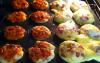
I just made some amazing quiches that I'd like to share...

Reduced Fat Cresents (one package made 16 quiches)

Used a mini cupcake pan

One was with one egg, cheese, and turkey bacon...calorie count 34

The other was with turkey pepperoni, cheese, and tomato sauce...calorie count 22

My 13 year old and his friend even loved them! I'll be trying with other combinations. I haven't calculated the Protein yet, but if anyone is interested in finding out let me know and I'll post it.

Enjoy!!

post-29880-13813662766424_thumb.jpg

  • Replies 7
  • Views 1.2k
  • Created
  • Last Reply

Featured Replies

Looks delicious.... I'd like to know how to make them.....Thanks for sharing.....'

Those look so yummy! Going to try those for sure! Thanks for sharing

  • Author

I just used a mini cupcake pan and lined 16 with reduced fat cresents and then added the following:

Breakfast Quiche

In a bowl I mixed one egg, a pinch of shredded cheese, and two slices chopped turkey bacon.

Then I scooped using an ice cream scoop making 8 mini quiches.

pizza Quiche

I mixed in a bowl 1/4 cup of tomato sauce, 1/3 cup of shredded cheese, and about 10 chopped turkey pepperoni's. Scooped onto cresents making 8 quiches.

Baked on 350 for about 10 mins.

I love quiche but made them without a crust. Very good. I also used cottage cheese instead of cream or milk and just added a little Parmesan so not to have too much cheese

Archived

This topic is now archived and is closed to further replies.

Trending Products

PatchAid Vitamin Patches

Account

Navigation

Search

Search

Configure browser push notifications

Chrome (Android)
  1. Tap the lock icon next to the address bar.
  2. Tap Permissions → Notifications.
  3. Adjust your preference.
Chrome (Desktop)
  1. Click the padlock icon in the address bar.
  2. Select Site settings.
  3. Find Notifications and adjust your preference.