Skip to content
View in the app

A better way to browse. Learn more.

BariatricPal

A full-screen app on your home screen with push notifications, badges and more.

To install this app on iOS and iPadOS
  1. Tap the Share icon in Safari
  2. Scroll the menu and tap Add to Home Screen.
  3. Tap Add in the top-right corner.
To install this app on Android
  1. Tap the 3-dot menu (⋮) in the top-right corner of the browser.
  2. Tap Add to Home screen or Install app.
  3. Confirm by tapping Install.

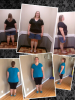
Before & After @ 2 months

So excited! I've gone from a size 24 to a 16! I haven't worn a 16 …gosh…since middle school maybe ...& I'm 29 btw...

Today I am -57# & almost @ 3 months. And shopping @ the GW regularly, because I can't stay in my pants very long. (what an awesome problem to have!!!)

My great news this week, I FIT INTO A 14W!!!! NEVER IN MY LIFETIME DO I REMEMBER THAT SIZE, I THINK I SKIPPED IT...BUT NOW I'm going to blink through it. Hehe ;-)

Life is better :-) For all of you "thinking about it..." DON'T ...JUST DO IT & START LIVING!!!

[ATTACH]8618[/ATTACH]

post-43327-13813662563522_thumb.png

  • Replies 12
  • Views 1.1k
  • Created
  • Last Reply

Featured Replies

Your rockin that sleeve! Keep up the good work.

  • Author

Thank you!!! I appreciate the encouragement!!!

  • Author

This pic is around -45# loss for those wondering. (I need to take another pic, I do every month on the 25th ...I'm at -57# now)

Starting weight: 301.7#

Surgery Day Weight (10/25/12): 285#

Pictured: 256.8#

I HATE sharing #'s but we're ALL in this together!!!

Congrats! You look great!

Looking good! I can really see it in your upper body.

wow! you're lookin good!!!

  • Author

Thanks ladies! I appreciate the encouragement! You girls keep up the hard work too! ;-)

  • Author
I'm wearing the same size I wore in college 20 years ago. Only 2 months out and 3 sizes down.

Great job!!! Keep it up ;-)

Archived

This topic is now archived and is closed to further replies.

Trending Products

PatchAid Vitamin Patches

Account

Navigation

Search

Search

Configure browser push notifications

Chrome (Android)
  1. Tap the lock icon next to the address bar.
  2. Tap Permissions → Notifications.
  3. Adjust your preference.
Chrome (Desktop)
  1. Click the padlock icon in the address bar.
  2. Select Site settings.
  3. Find Notifications and adjust your preference.