Skip to content
View in the app

A better way to browse. Learn more.

BariatricPal

A full-screen app on your home screen with push notifications, badges and more.

To install this app on iOS and iPadOS
  1. Tap the Share icon in Safari
  2. Scroll the menu and tap Add to Home Screen.
  3. Tap Add in the top-right corner.
To install this app on Android
  1. Tap the 3-dot menu (⋮) in the top-right corner of the browser.
  2. Tap Add to Home screen or Install app.
  3. Confirm by tapping Install.

Working Out At Home

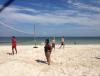
I purchased an elliptical today. I'm excited to set up a workout space in my home. I still can't really eat but I'm determined to fight the thigh droop. Went on a cruise to Mexico last week and worked out a lil everyday. Even played beach volleyball in my swimsuit!!!! :o Loving this new life. :rolleyes:

post-40546-13813660445347_thumb.jpg

  • Replies 9
  • Views 868
  • Created
  • Last Reply

Featured Replies

That's awesome! What one did you buy? I'm looking to get one sometime soon.

  • Author

Body Rider Elliptical Trainer. I purchased it online and it wont be here till next week but I'll let you know how it works out.

Body Rider Elliptical Trainer. I purchased it online and it wont be here till next week but I'll let you know how it works out.

That would be great, thanks!

Now that's what I'm talking bout....I'm lovin the beach volleyball (and go gurl, lovin the swimsuit :)...even got the young whipper snapper starring) :blink::rolleyes: I can't wait!!

Keep up the great work.

  • Author

Lol. You're hilarious. Thanks.

Awesome girl!! That young kid is checking you out!!! ????

  • Author

STOP IT !!!!! Y'all are cracking me up. That sweet boy was NOT looking at me

You go girl:)

STOP IT !!!!! Y'all are cracking me up. That sweet boy was NOT looking at me

LOL!!!

Archived

This topic is now archived and is closed to further replies.

Trending Products

PatchAid Vitamin Patches

Account

Navigation

Search

Search

Configure browser push notifications

Chrome (Android)
  1. Tap the lock icon next to the address bar.
  2. Tap Permissions → Notifications.
  3. Adjust your preference.
Chrome (Desktop)
  1. Click the padlock icon in the address bar.
  2. Select Site settings.
  3. Find Notifications and adjust your preference.