Skip to content
View in the app

A better way to browse. Learn more.

BariatricPal

A full-screen app on your home screen with push notifications, badges and more.

To install this app on iOS and iPadOS
  1. Tap the Share icon in Safari
  2. Scroll the menu and tap Add to Home Screen.
  3. Tap Add in the top-right corner.
To install this app on Android
  1. Tap the 3-dot menu (⋮) in the top-right corner of the browser.
  2. Tap Add to Home screen or Install app.
  3. Confirm by tapping Install.

NSV!!

  • Replies 20
  • Views 2.5k
  • Created
  • Last Reply

Top Posters In This Topic

Most Popular Posts

  • Oopsseedaisy
    Oopsseedaisy

    Keep up the good work! You are looking good and feeling better I bet!

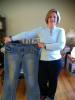
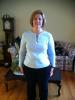
  • I have been hearing that from alot of people that they would have guessed me to be smaller then a 16 too!! WOOHOO!!! I can't imagine what I'm going to look like after another 50 pound loss...This is a

Posted Images
Featured Replies

Kristy! You look great! I agree with others, you look smaller than a size 16. I'm going to have to do this too, compare two pics. I don't think I really percieve the true difference, the changes my body made. I will see if I can locate some pics. It's hard because I've been very camera shy in the past! I wonder why? :-)

WOW! Tremendous difference!! Congrats!

Join the conversation

You can post now and register later. If you have an account, sign in now to post with your account.

Guest
Reply to this topic...

Trending Products

PatchAid Vitamin Patches

Account

Navigation

Search

Search

Configure browser push notifications

Chrome (Android)
  1. Tap the lock icon next to the address bar.
  2. Tap Permissions → Notifications.
  3. Adjust your preference.
Chrome (Desktop)
  1. Click the padlock icon in the address bar.
  2. Select Site settings.
  3. Find Notifications and adjust your preference.