Skip to content
View in the app

A better way to browse. Learn more.

BariatricPal

A full-screen app on your home screen with push notifications, badges and more.

To install this app on iOS and iPadOS
  1. Tap the Share icon in Safari
  2. Scroll the menu and tap Add to Home Screen.
  3. Tap Add in the top-right corner.
To install this app on Android
  1. Tap the 3-dot menu (⋮) in the top-right corner of the browser.
  2. Tap Add to Home screen or Install app.
  3. Confirm by tapping Install.

My first pics....

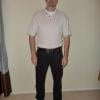
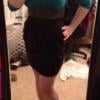
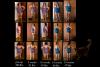
I have taken photos every month since the three week mark after my surgery and am ready to show them. ;-P

I wish, of course, I took one before my pre-op as I was 30 pounds heavier than the first photo. I will look around for a photo that I can put in, meanwhile I have been good about doing them roughly every month since.I have had to switch to a smaller bathing suit- hooray!

I am poised on the verge of Onederland and 42 pounds from my goal.

SCREECH!!!!!

We just figured out the first set is actually pre-op- in fact it is from March. There is a second one from 3 weeks out my husband forgot to insert- now it makes sense! I swore I had done one pre-op but as photographers we have so many floating around! SO here is the real deal: pre-op to now....

post-7262-13813657471599_thumb.jpg

  • Replies 35
  • Views 3.7k
  • Created
  • Last Reply

Top Posters In This Topic

Posted Images

Featured Replies

You not only look leaner, you look taller too. Congrats! Thanks for sharing!!

Wow Meggie, such a huge difference! You're doing a great job!!! B)

WOW! You are doing incredible. And look how your tummy snapped right back up to where it should be...awesome!

Looking great, my friend!! :)

You look great Meggie!

Wow!!! You look great. I am waiting for my insurance approval. These pictures sure give me an extra push to go forward. Thanks!!! I am hoping to have my surgery on Oct. 24, 2011.

Join the conversation

You can post now and register later. If you have an account, sign in now to post with your account.

Guest
Reply to this topic...

Trending Products

PatchAid Vitamin Patches

Account

Navigation

Search

Search

Configure browser push notifications

Chrome (Android)
  1. Tap the lock icon next to the address bar.
  2. Tap Permissions → Notifications.
  3. Adjust your preference.
Chrome (Desktop)
  1. Click the padlock icon in the address bar.
  2. Select Site settings.
  3. Find Notifications and adjust your preference.