Skip to content
View in the app

A better way to browse. Learn more.

BariatricPal

A full-screen app on your home screen with push notifications, badges and more.

To install this app on iOS and iPadOS
  1. Tap the Share icon in Safari
  2. Scroll the menu and tap Add to Home Screen.
  3. Tap Add in the top-right corner.
To install this app on Android
  1. Tap the 3-dot menu (⋮) in the top-right corner of the browser.
  2. Tap Add to Home screen or Install app.
  3. Confirm by tapping Install.

Virtual Model

  • Replies 41
  • Views 6.5k
  • Created
  • Last Reply

Top Posters In This Topic

Posted Images

Featured Replies

  • Author
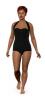
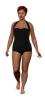
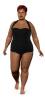
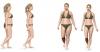
I had fun playing with my virtual model but don't know how to post it. How did you get all of the different weights to display together?
I right clicked and saved the images, created an html page in Microsoft FrontPage with the corresponding weights and then did a print screen to crop the image in PhotoShop and post it here on LBT.
  • Author

LOL..it is fun, isn't it? I don't think I look like my current weight virtual model either but that's ok. I know that I weight 192 and that's all that matters. :o

  • Author
well I tested it and Im to fat..lol ah well it only computes up to 240..how did you get yours to 270??
I had to use the Prevention one in order to get up to 274. The others only go up to 240.

Join the conversation

You can post now and register later. If you have an account, sign in now to post with your account.

Guest
Reply to this topic...

Trending Products

PatchAid Vitamin Patches

Account

Navigation

Search

Search

Configure browser push notifications

Chrome (Android)
  1. Tap the lock icon next to the address bar.
  2. Tap Permissions → Notifications.
  3. Adjust your preference.
Chrome (Desktop)
  1. Click the padlock icon in the address bar.
  2. Select Site settings.
  3. Find Notifications and adjust your preference.