Skip to content
View in the app

A better way to browse. Learn more.

BariatricPal

A full-screen app on your home screen with push notifications, badges and more.

To install this app on iOS and iPadOS
  1. Tap the Share icon in Safari
  2. Scroll the menu and tap Add to Home Screen.
  3. Tap Add in the top-right corner.
To install this app on Android
  1. Tap the 3-dot menu (⋮) in the top-right corner of the browser.
  2. Tap Add to Home screen or Install app.
  3. Confirm by tapping Install.

51 lbs down

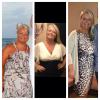
Hi I'm 6.5 months into band and losing so slow now. It's easy to get despondent but looking at pictures I can see a big difference just not when I look in the mirror

First picture was Sept

2nd Xmas

3rd today.

post-204610-13813134847464_thumb.jpg

post-346582-1381314136685_thumb.jpg

  • Replies 8
  • Views 1k
  • Created
  • Last Reply

Featured Replies

oh wow you seriously do not see? Put the first and the last next to each other and look again. You will notice. I do that a lot when looking at pics. Great job!!

You looking good. It takes a while before our brain catches up to our weight loss.

Congratulations and you look great! Where were you in the first pic, looks like some beautiful scenery behind you?

  • Author
Congratulations and you look great! Where were you in the first pic' date=' looks like some beautiful scenery behind you?[/quote']

It was in Cypus x

I can see in the pictures especially my face but think its hard to get that fat image out my head when looking in the mirror xx

Thanks you cc

You still looking good:-)

Amazing progress... keep up the good work! Yes, unfortunately the brain is slow getting the message. Pictures do help! Congratulations.

You look fabulous!! Congrats!!

Archived

This topic is now archived and is closed to further replies.

Trending Products

PatchAid Vitamin Patches

Account

Navigation

Search

Search

Configure browser push notifications

Chrome (Android)
  1. Tap the lock icon next to the address bar.
  2. Tap Permissions → Notifications.
  3. Adjust your preference.
Chrome (Desktop)
  1. Click the padlock icon in the address bar.
  2. Select Site settings.
  3. Find Notifications and adjust your preference.