Skip to content
View in the app

A better way to browse. Learn more.

BariatricPal

A full-screen app on your home screen with push notifications, badges and more.

To install this app on iOS and iPadOS
  1. Tap the Share icon in Safari
  2. Scroll the menu and tap Add to Home Screen.
  3. Tap Add in the top-right corner.
To install this app on Android
  1. Tap the 3-dot menu (⋮) in the top-right corner of the browser.
  2. Tap Add to Home screen or Install app.
  3. Confirm by tapping Install.

Amazed!!!

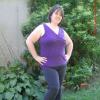
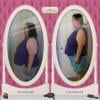
I am loving this band. I started out at 298 lost 20 lbs preop and have lost 51 lbs since surgery. I work out 5 times a week and eat very healthy. I feel amazing and have so much energy to spend on my kids. Best decision ever!!!!

post-205595-13813134817667_thumb.jpg

post-217713-13813134817974_thumb.png

Adrianna - Sent from my iPhone using LapBandTalk

post-345313-13813141265296_thumb.jpg

post-345313-13813141266121_thumb.jpg

  • Replies 9
  • Views 1.1k
  • Created
  • Last Reply

Featured Replies

Awesome!!! Grats!

Absolutely beautiful!!!

Congratulations!! I love hearing good news about the band! It is very inspirational.

Awesome!! You look great. Keep you the good work!

Congrats on your hard work. I can see that it is paying off for you! Keep it up!

Awesome job girl!

  • Author

Thanks so much everyone for your words of encouragement. It really helps keep me motivated and focused.

Adrianna - Sent from my iPhone using LapBandTalk

Great job! You can tell a big difference, good for you!!

Congrats! You look amazing!!

Archived

This topic is now archived and is closed to further replies.

Trending Products

PatchAid Vitamin Patches

Account

Navigation

Search

Search

Configure browser push notifications

Chrome (Android)
  1. Tap the lock icon next to the address bar.
  2. Tap Permissions → Notifications.
  3. Adjust your preference.
Chrome (Desktop)
  1. Click the padlock icon in the address bar.
  2. Select Site settings.
  3. Find Notifications and adjust your preference.