Start here
Where are you in your journey?
Choose the path that fits today. We’ll take you to the most useful discussions.
- GLP-1 medication Zepbound, Wegovy, access, side effects, progress, and support.
- Before surgery Compare procedures, plan ahead, and get honest pre-op answers.
- Post-op Recovery, food stages, symptoms, and support.
- Long-term Regain, labs, habits, and life after the honeymoon.
- Revision Explore revision options, complications, and next steps.

leesh_213
Pre Op
-
Joined
-
Last visited
-
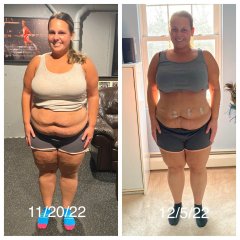
My gastric sleeve surgery progress!
-
-
-
-
Thank you everyone for your input! I do notice the hiccups, and the burping, which also happens when I’m not eating too. Also I had my first post-op appt on 12/7 this week I’m on liquids and puréed stage and my surgeon told me that the sleeve can hold up to 6oz so I’ve been consuming about 1/2 cup of food which is 4oz. I bought some ramekin bowls from Amazon they have different sizes I chose the 4oz ones and they’ve been great to use so I don’t have to measure 1/2 cup each time I eat since I have them to use as a guide. Good luck to everyone with their journeys pre-op and post-op!
-
-
-
-
-
Hi, I’m Alicia. I just had the gastric sleeve done on 11/21 so I’m a lil over 2 weeks post-op and I know when I’m hungry, but I’m having trouble telling when I’m feeling full. Has this happened to anyone else in the beginning or in general after surgery? I try to really listen to my body when I’m eating, and eat slower, but I’m still unable to tell when I’m full. I normally just stop eating when I feel like its in my throat and it’s going down slowly. I’ve been avoiding throwing up and I don’t want that to happen, so that’s why I try to not finish everything I’m eating at the time. Any advice on how to tell when you’re full or feeling satisfied? Thanks in advance!