Gossamer
Gastric Sleeve Patients
-
Joined
-
Last visited
-
-
-
-
-
-
-
-
-
-
-
-
-
-
-
-
-
-
-
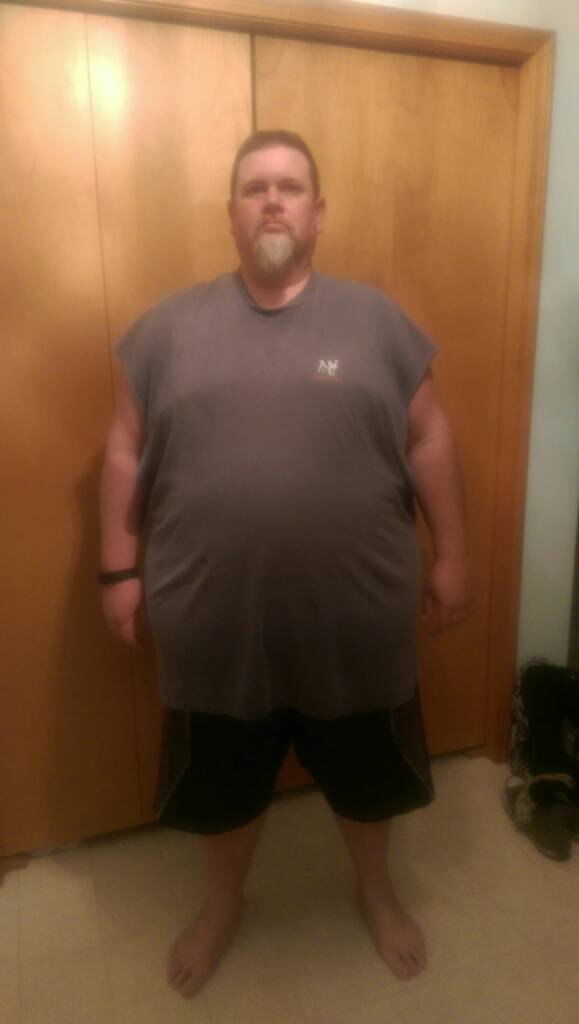
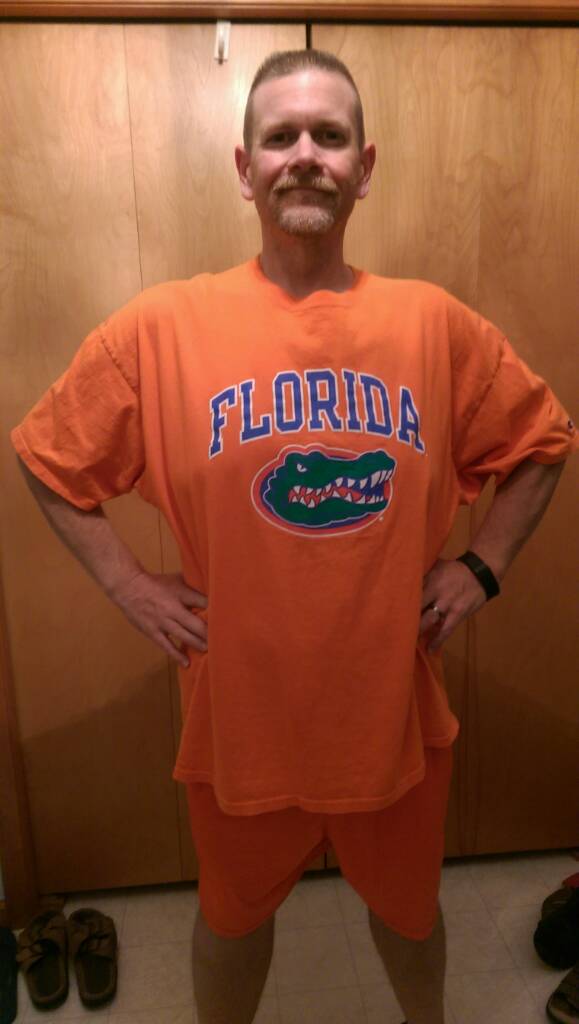
Hey all, One year ago today was the day I decided to make the decision for a healthier lifestyle. Although my sleeve surgery wasn't until October I decided that it made more sense to start getting used to watching what I ate rather than making a mad dash until the last minute. So fast forward one year and I feel compelled to share with you my progress thus far.....197 pounds lost...before pic 393 pounds and currently 196 Sent from my 831C using the BariatricPal App


-
yay another Michigander....best of luck!
-
I really like the vanilla flavor of the Dymatize ISO-100 protein powder. Highly recommended giving it a try..
-
 Gossamer reacted to a post in a topic:
May have bit off more than I can chew......hobby related fun on the way !
Gossamer reacted to a post in a topic:
May have bit off more than I can chew......hobby related fun on the way !
-
I agree, try to occupy your mind with other things to keep you distracted. This worked for me well to keep my mind off of food.
-
-
were doing awesome, best life decision we've ever made!
-
I went to GHP also.....Dr. Baker did my sleeve and also my wife's too...
-
My wife and I both were recently sleeved, she had hers in September and I went in October....we decided to go on the journey together and don't have one regret. We also find that we keep each other accountable as well as being each other's support system.
-
I think everyone is different but, personally I went back to work after 1 week off and do feel I could have done it sooner. I work in a factory and gave a fairly physically demanding job so I hope this shines some light on your situation. All in all I had zero pain and only some discomfort and tightness from a hernia repair.
-
It really depends on how you feel, I'm 2 weeks out today and returned to work this past Monday with only a little fatigue really. I have a physically demanding factory job and do 10 hour days, so it really depends on how you feel I think.
-
Hey everyone, 4 days post and surprisingly doing very well zero pain just tightness from the hiatal hernia repair. Protein intake is close to 60 grams and almost hitting 64 oz water. Glad to be improving daily and hope everyone else has continued recuperation as well!
-
Congrats, I was sleeved yesterday and currently waiting to be discharged, zero problems with the surgery just the occasional gas pain but I know this will subside and all will be good!
-
p.s. thank you to all the well wishers, it means a lot to me!
-
Everything went fantastic, mild discomfort from the hernia repair but zero pain from sleeve.....walking lots, and doing well with protein also. Hopefully I'll get released in the morning....????
-
Today's the day.....I'm currently in pre-op patiently waiting for this party to get started! See you on the other side peeps.....
-
Everyone here is so supportive, you won't have any problem fitting in and having an encouraging word is ALWAYS at the ready by the whole group. Congrats on your progress and continued success to you.