nomilktoday
Pre Op
-
Joined
-
Last visited
Everything posted by nomilktoday
-
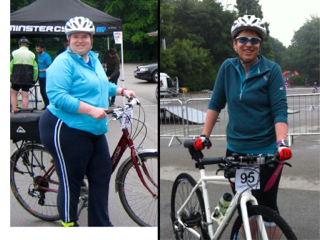
Have just done a 21 mile charity cycle ride with the family today. Did it last June too, pre surgery. Last year took over 3 hours. Today, 1 hr34 mins. Surgery 3rd Sept 2015 Wt 288 June 2016 Wt 182 Still 28 pounds to go, but feeling proud today!
-
Well done A great achievement. I've just signed up for my first half marathon at the end of October. Did my first 10k race last month. Still have 29 pounds to lose. You are an inspiration. Well done again!!!!!
-
I'm in the North of England, but keep a low profile as only 1 person outwith my immediate family knows I've had surgery.
-
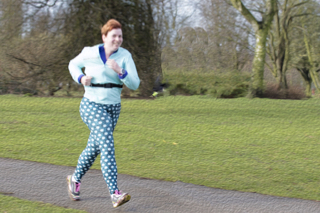
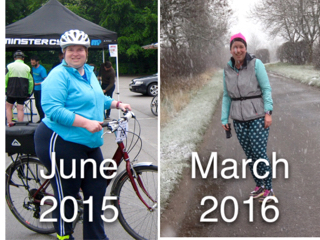
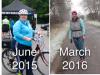
Here are some photos I have been doing Parkrun, a local 5 km run that takes place in the UK ( and other countries too I think) since November 2015. My goal this year was to run a 10k race. I have entered the City of Lincoln 10k on 17th April and am running for the Motor Neurone Disease Assosciation ( ALS in US) The photo in the sunshine was taken this morning. The photo in the snow, was taken yesterday. The one with the bike was taken last year- pre surgery. I always *tried* to be fit and the cycle was a 21 mile ride for charity. Looking back, I don't know how I managed it when I was so big.
-
Well done. You should be really proud of your success. Keep up the good work. Enjoy the new you
-
Scout, your profile says you are doing great too! Well done. Here 's to the next 6 months
-
I had my sleeve on 3rd Sept 2015. I weighed 288 pounds Today I weigh 195 pounds I have lost 93 pounds and have 41 still to lose. Everyone says how much better I look, and my head sees that I have dropped from a UK size 24 to a UK size 12 - 14, but I still feel fat. I've got a saggy belly, terrible flabby arms and flabby thighs. I'm doing LOADS of exercise ( 7 or 8 times a week) and have entered a 10km run for charity on 17th April. I am much fitter thanI was before, but I still feel fat. My BMI is still in the OBESE range, and I am desperate to be * just* overweight I think I'm feeling a bit low too, as I've had my first gain after steadily losing ( only a 0.4 pound gain) I don't know if I'm eating too much or too little or what? Thanks for letting me offload.
-
I was, and still am, constantly cold. Still, I have lost 88 pounds in 5 months, so being cold is fine by me!!
-
Good luck Hope your surgery went well yesterday.
-
Well done! You look fantastic and have a great attitude.
-
I am almost 5 months out from having my sleeve and have lost 83pounds. I was telling this to a friend and she mentioned that she guessed that was about what my sporty younger daughter ( age 9)weighs. So I weighed her. She is 81 pounds. Wow I have lost an entire small person. I tried carrying her for a few minutes yesterday and was exhausted. No wonder I was always tired and had no energy. No wonder my knees and ankles ached. My life has changed immeasurably, and it's only going to get better. I'm even starting to suspect that I , too, have collar bones! 83 pounds gone. 51 to go.
-
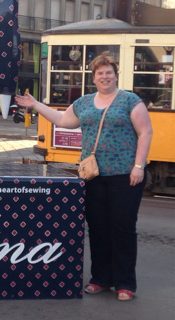
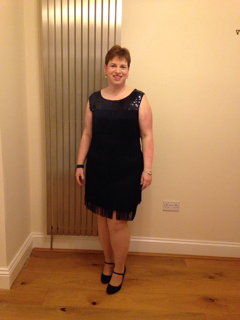
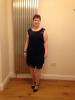
I have worn a new dress at my office Christmas party for the first time in over 6 years. This year I had a choice in the shop , rather than having to take the only dress that fitted. I was sleeved on 3 rd Sept 2015 and have lost 68 pounds so far. I'm hoping to reach 70 pounds lost by Christmas ( 5 stone for all my fellow Brits!) I'm now half way there to my current goal of 154.

-
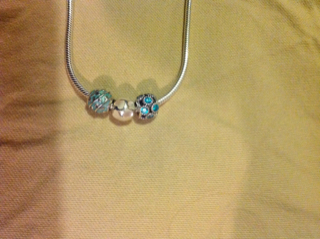
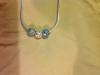
I'm in the UK, and traditionally we measure weight in stones and pounds, rather than just pounds.( a stone is 14 pounds) For each stone I lose I buy a charm to put on a necklace. Pandora is the brand. Well today I have lost a total of 56 pounds or 4 stone, so this weekend I get a new bead for my necklace. ( sadly I need about 10 beads in total, but hey, I'm getting there.) Was just sleeved on 3rd Sept.
-
What strength of calcium supplements are you all prescribed? Each day I have two tablets. Each has 1.25 g of calcium and 200 units of Vit D My multivitamin has 400 units of Vit D I'm just wondering if I can cut the calcium supplements to 1 a day?
-
Thanks for all your replies, suggestions and support. I was only sleeved on 3rd Sept, so am still adjusting.
-
I have just had a 3 night short break away with my husband, mum , and 2 daughters. It was strange. I enjoyed wearing clothes that fitted, walks along the beach, and the lovely autumn colours. But I have realised how much of my holiday enjoyment resolves around food. Visit to stately home - no tea and scones for me. Seaside - no ice cream or chips. Nice artisan bakery, I had to watch as family had almond croissants and bought still warm fresh bread. I queued for AGES in a coffee shop to get a skinny latte, but they had NO skimmed milk. A skinny latte is just about the only thing I can enjoy and feel normal when I'm out and about. I am just feeling a bit down, and my family, whilst supportive, don't really understand how I feel. I paid to have surgery privately, so do not have access to psychology support. Thanks for " listening"
-
I use an App called Body Shot It stores the photos away from your camera roll, so people don't get a shock if you are scrolling through for your kids' birthday photos!!!!!
-
I am 6 weeks out since my sleeve. I have lost a total of 40 lbs ( including pre op diet). I am now officially "obese" rather than "morbidly obese" Woo HOO!!!
-
Wow! Well done.
-
Sorry Have just joined then left the Facebook group I'm not vey experienced with Facebook, and I'm scared other people will see if I post on it. I REALLY want to keep this information private Good luck, folks I'll stay on Bariatric Pal as I have a pseudonym.
-
Inkie, I have just had an e mail saying I am not allowed to use the private message system???? Any ideas how I can join your FB group? Can you message me? Does anyone have an idea how. I can be allowed to send a message
-
Have messaged you inkie
-
Oh, and I kept it secret too. Only my husband ( and children), my mum and my best friend know. I told work I was having "abdominal surgery" . If anyone comments on how little I'm eating now, I tell them I was told I was at high risk of developing diabetes, and was strongly advised to lose weight. It helps a bit that I lost 3 stone myself 2 years ago (and put it all on again????) Good luck.
-
I'm in the UK too. I paid privately and had my op on 3rd September 2015. Doing OK so far. Have lost 33lbs in total, and did my first Parkrun on Saturday.( I walked the whole 5k and was the last to finish) Still, I'm being positive and using the "This girl can " mantra........ " I may be slow, but I'm lapping everybody sitting on the couch!"
-
Thanks, Kate for the tips. I'm still new to all this!