jdmama911
Gastric Sleeve Patients
-
Joined
-
Last visited
-
-
-
-
-
-
-
-
-
If you think that your honest story of weight loss will help a heavier friend, then I think you should tell them! I have been an open book about my surgery. I even told all 5 football coaches of my sons team that I was having the surgery. Because of my openness, I've had 3 people tell me that I personally have inspired them to do something about their weight. 2 of the 3 are in the beginning process of weight loss surgery. I feel like our stories are a duty to share to someone who may gain from it. I didn't consider the surgery after my mom had it, but after meeting 2 women that had the surgery I began to consider WLS as a viable option. I don't know if I would have considered it if I hadn't met those women. I wish I could go back and thank those ladies (I met both randomly as strangers who struck up conversations with me) for telling me their stories.
-
-
I'm down to 187. My highest weight was 335. When I see someone who is very big or larger than I was, I tend to feel empathy toward them. I also can't stop thinking about myself at that weight. All the baggage I carried around, and how much I hated being in public. I try not to do the things to heavy people that bothered me. ie: people didn't like to stand near me in a line, they would avoid the aisle I was in because they didn't want to squeeze by me, not many people smiled at me or made small talk. etc. Those types of things have ceased now that I'm down to a more "normal" weight. The world is a lot friendlier, and I try to extend that to people that give me these flashbacks. I have noticed more heavy people being more cynical toward my friendliness recently though (as someone else mentioned). It will not deter me. I just hope they can one day find answers as I did.
-
-
-
-
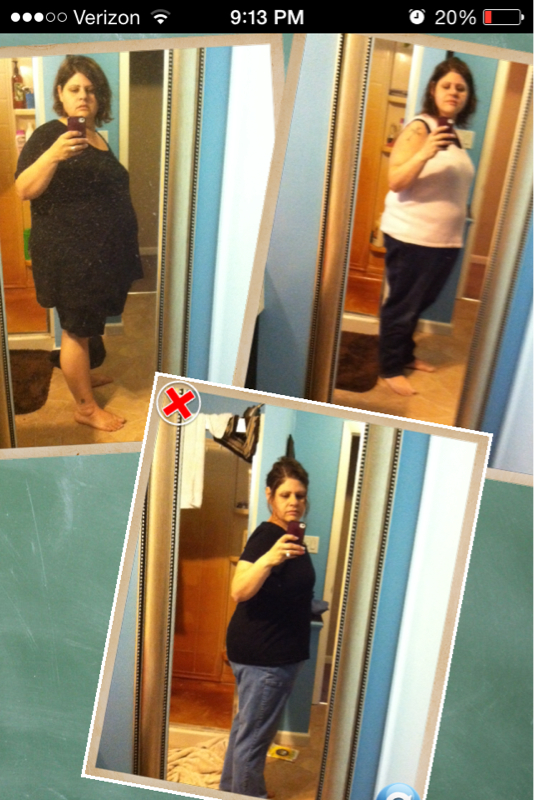
I haven't been on here in awhile. Life has been crazy busy though! Here is a pretty current day after surgery pic and a now pic. Life has been pretty good. The thoughts below are underlying thoughts that I know need addressed and I'm not sure where to start or even if it's as huge of a issue as I'm thinking it is. I'm scared though. I'm scared because my husband is so in awe of my success he is slightly blinded. If I slip up he doesn't see it. I'm not where I expected yet and don't want to be content. I'm down to 195. I mean, if in a few years, I ended up at this weight and this is where I was happy eating I would be fine, but I have never been lower, and would like to see if I would be happy maintaining around 175. I really am happy with how things have been going, until the last couple of weeks. My weight loss is staying on a consistent pattern, but I haven't been as vigilant with my eating habits. I'm eating more junk food and allowing it to be in the house. I know it's a slip up and will be fixing it the second company leaves on Friday. I'm also scared because I caught myself emotional eating this weekend after my husband quit his job. He has some temporary jobs/work that is off the books, but this job loss was sudden and he didn't have time to secure a real job before he quit. Ugh, my PA told me at my last check up that I need to give myself more credit for the weight loss. I have been successful on a lot of fronts, but fear and self doubt still are a big battle for me that I haven't been able to conquer yet. This part of the journey is a lot more difficult for me than any part I've experienced yet. Sorry if I'm not making much sense, but I've been up since 6am, tired, and reflecting on my eating habits this weekend which alarmed me...Carry on HW: 335 9/11/13 SW: 297 CW: 195 6/8/14

-
Too early I think! I was allowed a little at 1mo., and he is more relaxed about alcohol than a lot of surgeons.
-
My mom had gastric bypass about 5 years ago. She dropped about 60-70lbs quickly and then stayed at the upper 190's for almost 2.5 years. In the past 6 mos. she has dropped all her weight! She did change her eating habits (not super drastically though), but it just like clicked for her with her body. She went to the doctors last week and weighed 135lbs. and the doc. told her to NOT LOSE ANYMORE WEIGHT. She went clothes shopping and fit into a pant size 6! Don't give up and keep plugging away.
-
It may help for you track a couple of days to see your calorie intake. I'm sure it's still low though. You should be getting increase hunger here and there as you aren't at full capacity until 7-9mos? That happened to me. Just me mindful that your new hunger isn't head hunger. If it is, find a way to fight back. If it's true hunger, can you eat another bit of Protein at dinner to see if that will keep you full longer. Otherwise, make a smart snack option and build it into your day. (I get hungry about an hour before bed, and that is my time of the day to eat 1 handful of nuts. It gives me some protein and allows a small snack that I feel good about eating. Hope my rambling helped HW: 335 Program entrance: 312 SW 9/11/13: 297 Today's Weight: 194
-
Unfortunate events and "mistakes" alike are our chance to learn and change and grow. They are learning opportunities in my eyes. Mistakes/bad things happened, so don't dwell on it regretfully. Instead, look back with perspective and eventually hindsight. That way you aren't strung up on bad feelings, and instead you grow. I'm embarrassed to even say this. No one in my family even knows this happened. What got me to consider vertical sleeve surgery was when I hit rock bottom just over a year ago. My fat a** broke a toilet seat while I was at my moms. No one was home when it happened. I ran out and bought a new one to replace it. It didn't match at all though. I had to make up an elaborate story about how I stood on the seat to change a light bulb and I fell, and when I fell I broke it because of how I landed. I was so utterly disgusted with myself. I spent a week mourning over the fact that I had let myself get that fat. Today, I'm thankful that happened to me. It woke me up and told me I needed to take control before I wasted another 30 years of my life struggling only to end up fatter than before. I honestly have lived better and had more fun in the last 3 mos. than I have in the past 3 years. HW: 335 Program entrance: 312 SW 9/11/13: 297 Today's weight: 194
-
Stalls are normal. I stalled 3 times in the first 4 mos. now I tend to not lose for 2 weeks, then drop (In the beginning 10-15lbs.) 5-7lbs. quickly and the cycle repeats. HW: 335 Entered program: 312 SW 9/11/13: 297 Today 5/24/14: 194
-
I DEFINITELY have days like this. It actually seems to be more of cyclical thing for me. Like that's just the way my system works. I test with lean grilled chicken, and have days where more than an oz. at a time is too much, and days where I can eat 4oz. I never seem hungry and have more occupancies of suddenly feeling weak because I have forgotten to eat for most of the day. I don't have problems with drinking however, so I just be sure to stick with g2 on my non hunger days. I don't usually eat as much Protein as I'd like on those days, as fruits/veggies sit better in my stomach. But within a couple days I get hungry and am able to eat Proteins and other foods fine, then back to the non eating again. I discussed this with my surgeon's PA at my last visit. She didn't seem concerned about it, especially considering this has been going on since I started on soft foods (I'm now 7.5 mos out). It's been working for me so I'm not questioning it
-
G2 is fantastic! It will get you right out of dehydration. I use it every week. I'm good with my fluid intake most days, but then I'll get extra busy and forget for a day. I start getting dizzy and lightheaded. I drink my G2 for a day or 2 and start my cycle over again. It really does help.
-
-
-
-
Mirena was a TOTAL NIGHTMARE for me. It hurt badly going in. I was in pain for days. Then, every time I got my period the cramps were do bad that I had to actually call off work every month. I would just curl up in a ball and cry it got so bad. I suffered with it for a year. Now, my husband has a vasectomy. One of the top 5 days in my life was the day I got that thing out. I have 1 child, but I gave birth via C Section, so no help there on the pain.
-
-
 jdmama911 reacted to a post in a topic:
So, should I be 'disappointed', 'flattered' or 'indifferent'?
jdmama911 reacted to a post in a topic:
So, should I be 'disappointed', 'flattered' or 'indifferent'?
-
So you smoked all through pre-op and 5 months post-op? Did you tell your surgeon you smoke?No, I never told the surgeon, and yes I smoked just about every day during the entire process. I'm currently looking at a possible job change, so Ill have to stop my self medication and go on the pills for awhile. I'm definitely not psyched about it, but if I want to find the perfect job I have to be able to jump through the hoops. Ohio isn't very friendly about things like marijuana, so that's why I kept it from him.
-
I smoke it instead of using anti depressants. It evens me out mentally without all the insane side effects of pills. Anyway, I smoked up throughout my pre op and an 5 mos. post op doing great. I do occasionally get the munchers, but I eat healthier Snacks if that happens. I'm doing "excellent" according to my surgeon. It helped A LOT after surgery. I had trouble getting in fluids for quite awhile. But, after smoking I would have a little dry mouth and was able to tolerate more liquids. PM me if you ever want to
-
I eat beans all the time. My NUT said eating lean chili is good for you. I'm down 93lbs. since July 13.
-
That Whoaaa moment? While I have not seen the total difference quite yet (down 90lbs), I have had friends that...shall we say were a little over supportive. I mean I was 312lbs. at 5'3 3/4". That's big, and by the time I'd lost 15 lbs. I started getting "OMG you look FANTASTIC! You must have dropped at least 2 sizes!!" ?? Really? My weight fluctuated near 10lbs. on a daily basis b****. I was and still am very public about my surgery. The amount of support I have received is amazing, but at the same time Im over it, kind of. I feel like some of it is over dramatized. Every time I walk out of the door right now, I know Im going to be talking to someone about the surgery. And while Im not embarrassed about my surgery, I hate when someone starts talking loudly around complete strangers about it. It just irks me sometimes that people don't think some of those things through. I doubt they would like it if I started loudly talking about their colonoscopy with complete strangers around. I guess I feel like a spokesperson :/ I'm sure given a year a so when I've steadied, in weight, it will slow down with the ridiculous amount of (maybe fake?) compliments and questions. I do talk about the surgery because its new and it's what's going on in my life. That doesn't mean I want to hear how fat I was on a constant public basis. Although, I think I have "inspired" one person to look into WLS for herself. That is awesome to know. Ok, I think Im done whining about my overbearing support now.