orrio82
Gastric Sleeve Patients
-
Joined
-
Last visited
Everything posted by orrio82
-
I had the band put in 5/2010. Lost 50#. Was never able to get a fill without terrible complications. I ended up gaining 15# back, but threw up after eating almost anything. It was not fun. Went to see surgeon in June 2014. He ran tests and said the band should come out. I was scared I did not want to gain back the 35#. By pass scared me from the begining. He explained the sleeve to me, and I started the process. Oct. 6, I had surgery. I could not be happier. I am down 70# since 10/2014, 105 since 5/2010. I could not do it by myself. I had tried it all. Yes this is just a tool and there are things i have given up. I walk a mile religiously every day, sometimes more. I feel the best I have felt in over 30 years. Like anything, there were days I doubted my decison, but in the long run totally worth it.
-
I understand. Being overweight for over 30 years, it is hard to realized there is change. I have always made some excuse when someone complimented me. Now I just grin and say thank you. Still hard to acknowledge. I have to realized I should just feel proud.
-
I was banded in 2010 lost 50 lbs. Regained 15, but could not take fills and vomitied after every meal. My surgeon had left the area so I dealt with it. Summer of 2014 I had had enough. Met with a surgeon, he ran tests and took information and suggested the band come out. Scared I did not want to gain back the 35 I had lost. He said I just qualified for the sleeve (BMI 40). I started procedure and finished all and scheduled surgery for 10/6/2014. I was lucky my insurance did not require any long period and I am very anal when I make up my mind to do something. I started at 219 day of surgery 201 present 149. I stayed over night in hospital one night only. Was very fortunated, minimal complications. I was back to work in 8 days, 10 for my 2nd day. Have walked one mile every day since 10/15/14 missing only 3 days. Best desicion I have ever made. It is not easy, but worth it all. I started at 255 in 2009 size 26 3xl mow size 12/M.
-
I understand I my last couple times on a roller coaster has been embarassing. I was sleeved in October. In March went to amusement parks, was far from embarassing. When I pulled the bar down, there was left over room, so exciting.
-
I understand I my last couple times on a roller coaster has been embarassing. I was sleeved in October. In March went to amusement parks, was far from embarassing. When I pulled the bar down, there was left over room, so exciting.
-
I had the lapband in May of 2010. I lost 50 lbs, but regained 15 of that. Everytime I would go in for a fill, within 12-18 hours later I would be back in Urgent Care with the acid reflux cough the next day back to surgeon having fill out. I tried it evey 6 months for the first 2 years, then just stopped going. I vomited almost with every meal after 2 bites. Very frustrating. In June 2014, I met back with a surgeon, he suggested the band be taked out so the vomiting would stop. I was scared, I did not want to gain the 35 pounds back. He suggested the sleeve, and I started the procedures. I had both surgeries, the same day with a over night stay, October 6. Went back to work on the 15, and since that day I walk a mile on my lunch. Unfortunately, that is the only real exercise I get. Not that 1 mile 7 days a week is bad. I have lost 70lbs and have had no complications. Knock on wood. My only regret, is not doing it sooner. Good Luck you will love it
-
curious in what everyone follows. I try for 80 gm protien but unsure of the suggested carb, etc. I am 7 months out down 70 pounds and very happy. Though at the moment I am at a terrible stall and just wondering if I am not following something correctly. Trust me I have NO regrets, except for not doing this sooner. lol
-
you don't even realize what you can't do after so many years of being over weight. My husband and I just went to Florida for a few days, we drove down. I can rest my feet on the dash board, something I have not done in 30+ years. Played mini-golf and pickup my own ball. When I sat in the roller coasters, there was extra room in seat. Walk the parks with no problem. Go to beach in bathing suit. Sit on ground and get back up without help. Polish my own toe nails. endless possibilities. I have not been under 200+ lbs in 30 years. I am now about 150. My only regret that I did not do this sooner. I work hard to use my tool correctly, but would not trade it for anything
-
I found this very informative. I had surgery 10/6, I am down 60 some lbs 60 More than I have done in the past 30 years. Though I am on a stall very frustrating. I have walked a mile a day since 10/14 faithfully and just started back to the gym last week. I see a pattern between 4-5 a stall. I am sure this will pass and continue todo what I do. Whoever says this is the easy way out is totally wrong, it is truely just a tool. A tool I am happy to have. Congrats everyone
-
Please help I was sleeved October 2014. Happy with all walk a mile a day and am down 60 lbs. I feel fantastic. I work 2 jobs about 70 hours a week, so at times only the walk is all I am able to do. I know I need to do more. I need suggestions and is there any that help saggy skin. Thanks for all
-
Could be One guy said he was afraid to go to sleep with his wife lol Mine were not bad just took me by surprise
-
thank you. I feel great. I can do more without getting winded. It is amazing my only regret is not doing it sooner
-
I read and reread all I could. I prepared for the worse. I had no drastic exceptions. I was out only one week from my jobs. I was very fortunate. What I was not prepared for was the mood swings, which once I asked, many experienced the same. Nothing drastic just outbursts in crying, stuff like that. I had read so much nothing on that. I had surgery 12 weeks ago. My start weight was 219, day of surgery 202 and present weight 169. Went from a size 22 to 16 so far. There are stalls, but then it catches up. I have been very lucky, and just take one day at a time.
-
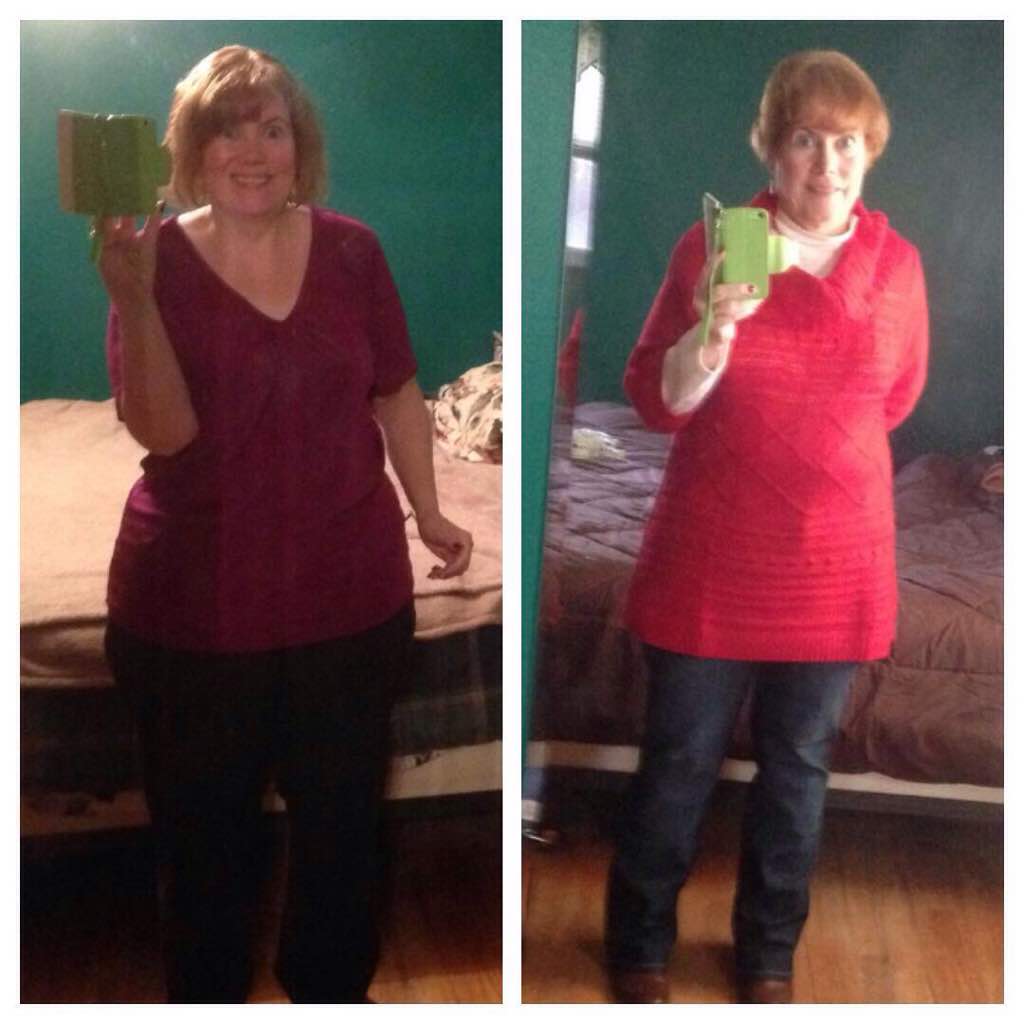
I am 12 weeks post surgery the first picture was taken 2 weeks after second on Monday. I could not be happier

-
I work 2 jobs, neither require any lifting per say, the main job has quite a bit of walking. I was sleeved on 10/6/14. Back to work on 10/13/14 both jobs on 10/15/14. I have no regrets. I am not one to sit home. I was very fortunate, I had very little complications. I started walking a mile a day on the 13th. This week I go for my one month visit and hope to be able to do a bit more. Good Luck. Each person is different. Go with your gut.
-
I had my surgery 10/6 2 weeks ago today. I feel good. No real complications. Went back to 2 jobs after one week. The last 8 days 7 of them I have walked a mile. Start puree/soft foods on Friday. I am fortunate the smell of food does not bother me, nor does it bother me when the office is full of sweets. Though the mood swings have been a bit frustrating. I read and read everything I could and thought I knew it all, WRONG. Emotional roller coaster, though been good for a few days. From the pre diet 9/15 of 219 to present down 27 lbs. very happy with my decision
-
I was sleeved on 10/6. I have been very lucky with minimal difficulties. I went back to work 10/14 both jobs. My weight has not moved in about 2 days, but I was prepared for that. The number one thing I wished there was more on was informed of the emotions. Monday I had a minor breakdown, couldn't stop crying. No one could reason with me or nothing. I finally went to the track and walked, by myself, 1 mile then felt better. Today at my job I started crying and had to walk away.
-
OH thank you I feel better hopefully we will continue to progress and feelings get in tact to better days thanks
-
I had Surgery 10/6 and returned to my part time job today, my full time job tomorrow and Wednesday will work both. I feel ok. Wondering about the double shift but should be fine.
-
I was sleeved 10/6. I must say my symptoms have been minimal. Some nausea on day 2 and being a bit tired, but that is it. I am back to work after one week all good. Today however I had a bad morning, very depressed and emotional. Cried at a drop of a hat. Is this normal or am I just losing it. Went to the track and walked a mile, came home and did a few things and feel better now, but it was unraveling. Please let me know if anyone else has experienced this.
-
I too am at a stand still but reading all this is reassuring. I lost 10 and scale has not moved in 4 days 3 days left to surgery
-
So understand the nerves@@10/6/14
-
Ok I have surgery on Monday. Very nervous, not exactly sure why. I have read everything there is to read and covered all possibilities. Still nervous. I am sure it is the right decision, and pre surgery diet has been ok. I have not had sweets in almost 4 weeks nor any soda and I have survived, not even tempted. Which I feel is a huge plus I feel. Still scared. I want it to be Monday afternoon already so it is done with. Though I may not be happy then either. Just hoping this is normal. Thank goodness for this sight
-
I am excited and nervous I have a surgery date of October 6 I am having the lap band taken out that was placed 4 years ago. I have lost 40 lbs with lap and kept it off. For that I am grateful. The band is not set right and needs to come out, but fear that I will gain is scarey. I definately can lose more weight as my BMI is 40. Start my 2 week diet tomorrow, I think I can do it. Have cut out all soda, sweets and most carbs. I am ready. I am scared, but determined. love this page